You move goods and you produce the paper that goes with them: a CMR for every truck, a bill of lading per shipment, a packing list per consignment and a commercial invoice for customs. The volume is high, the wording changes with every lane and customs variant, and the people who know what the document must say are in operations, not engineering. You want documents generated from your TMS or WMS at dispatch, templates your own team edits, and nothing in the loop that waits for a release. Connect from your own code, or from Make, Zapier, n8n or Airtable if you do not have an engineering team.
PDF Generator API
Bills of lading, CMR notes, packing lists and labels generated from your TMS or WMS data
Freight forwarders, 3PLs, carriers and logistics platforms generate bills of lading, CMR consignment notes, packing lists, commercial invoices, proof of delivery, delivery notes and shipping labels from the shipment record they already hold. Templates are edited in the browser by operations, not developers. Batch generation covers the dispatch run, and every document can carry your customer's branding rather than yours.
Bill of lading, CMR, packing list and labels from one payload
Barcodes and QR codes rendered inside the PDF, GS1-128 included
Per-customer branding through workspaces for 3PLs and platforms
14-day free trial. No credit card required.

1,500+
companies trust us
6M+
documents generated monthly
4.5★
Information security
Trusted by teams featured in our case studies


TMS, WMS and freight software vendors
You sell to the people above, and every one of your customers wants their own logo on the delivery note. Per-customer templates live in separate workspaces, each with its own branding, and you can embed the template editor inside your product so a customer changes their own packing list without opening a ticket with you. Your developers integrate once; your customers become their own template team.

Veeqo lets its retail customers design their own packing slips and labels
Veeqo gives retailers one place to manage inventory and shipping across Amazon, eBay, Shopify and their own stores. Rather than build a document designer, they embedded PDF Generator API’s template editor, so each retailer designs and prints its own picking and packing slips, drop notes and address labels.
PDF Generator API allows our customers to quickly design and print multiple document template types for Invoice PDFs, Picking/Packing Slips, Drop Notes, Address labels and pretty much any other document. Building a similar functionality in-house would have cost a lot of money in terms of resources.
-Ben Inman, Veeqo

A shipment is one record. It leaves your system as six documents.
A bill of lading, a CMR consignment note, a packing list, a commercial invoice, a delivery note and a pallet label all describe the same consignment. In most transport and warehouse systems each one is its own report, hard-coded by a developer years ago, formatted slightly differently, and updated by ticket.
So the new customs field goes into the commercial invoice and misses the packing list. The customer who wants their logo on the delivery note is told it will be in the next release. The dispatch run prints the labels from one system and the CMRs from another, and the two disagree about the consignee’s postcode.
Every one of those documents is legally or commercially binding once the truck leaves. They should not be the slowest part of your stack to change.
Shipping document templates your operations team owns
There is no fixed list of document types. A template is whatever you lay out in the editor: a form you already print, a label sized to your stock, a multi-page manifest, a one-line delivery receipt. If you can describe it, the same API generates it from your data, with the same barcodes, conditional content and per-customer branding available in every one. The nine below are the ones logistics teams ask us about most, and every one of them can come from the same shipment payload.
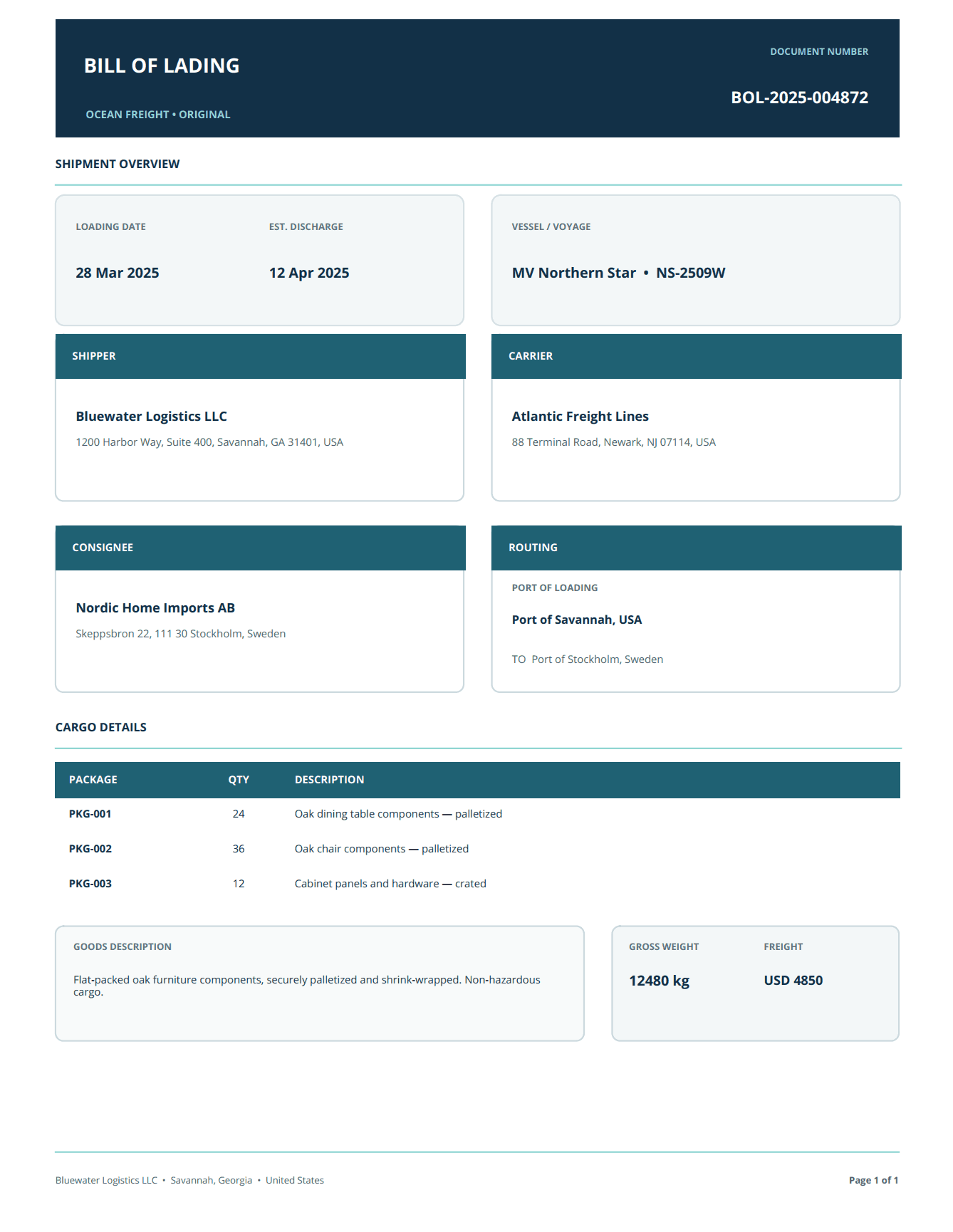
Bill of lading
Shipper, consignee, notify party, carrier, itemised cargo with marks, packages, weights and volumes. Dynamic tables grow with the consignment; conditional content shows the hazardous goods block only when the payload says so.
CMR consignment note
The standard 24-box layout with sender, consignee, place of taking over and delivery, attached documents, carrier instructions and the signature boxes. Generate one per vehicle from the load plan.
Packing list
Per-package contents with dimensions, gross and net weights and package type, subtotalled per pallet and totalled per consignment. An expression language handles the arithmetic so operations does not.
Commercial and pro-forma invoice
Line items with HS codes, country of origin, Incoterms and currency, formatted for the destination. The HS code and tax lines are data fields your system fills, not text someone retypes.
Proof of delivery
Generated at dispatch and signed at the door. Open it on the driver’s phone, capture the consignee’s signature, and the signed copy with name, time and IP address is stored against the shipment.
Delivery note
Customer-facing, so it carries the customer’s branding when you ship on their behalf. The same template renders under a different workspace with a different logo and footer.
Shipping and pallet labels
Address, routing, SSCC and tracking barcodes rendered as vectors inside the PDF, sized to the label stock. Batch a dispatch run into one file for the label printer.
Customs variants and local formats
Conditional content swaps a clause by destination country, and dates, weights, currencies and addresses format to the locale you pass. One template, every lane.
Air waybill and other carrier forms
Any fixed-layout carrier document works the same way: upload the form you use today, position the fields on top of it, and bind your data.
Highly flexible templates
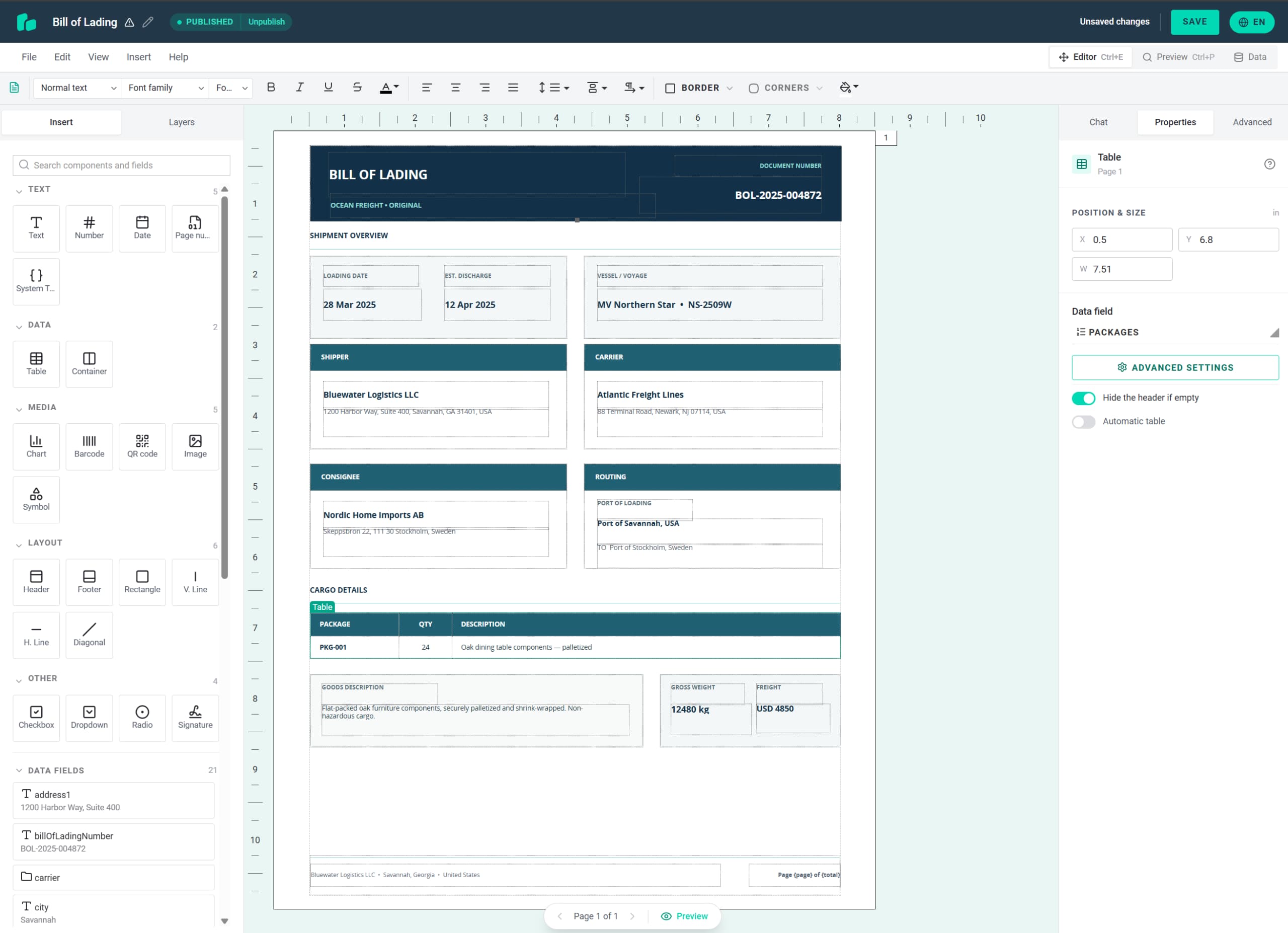
Jump into our live editor and customize the Bill of Lading (BOL) template below. Experience firsthand how simple it is to create and modify professional documents instantly, no code required.
Barcodes the scanner reads the first time
A label that does not scan stops a line. Barcodes and QR codes are rendered inside the document at generation time, as vectors, from the value in your payload. There is no external image service to fail, no resampled PNG to blur, and no size mismatch between the barcode and the label stock.
- Over 30 formats: the Code 128 family including GS1-128, EAN and UPC, Code 39 and 93, ITF, Codabar, postal codes, and on the 2D side QR, Data Matrix, PDF417 and Aztec
- Encode the SSCC, the tracking number or the order reference straight from your WMS field
- QR codes for tracking links, rendered deterministically, so the same input gives the same code every time
- Human-readable text under the bars, scaled to the barcode width

Batch generation for the dispatch run
When two hundred consignments leave at 16:00, you do not want two hundred API calls and two hundred PDFs to collate. A batch request takes a list of template and data pairs and returns them merged as one file, ready for the printer. Run it asynchronously and we post the result to your callback URL when it is done, so your dispatch process is not blocked while the documents render.
POST /documents/generate/batchfor one merged file from many documentsPOST /documents/generate/asyncand/batch/asyncwith acallback_urlfor long runs- Mix templates in one batch: the CMR, the packing list and the labels for the same load in one file
- Returned as a URL, base64 or a stored document you fetch later

Your customers' branding on every document
A 3PL ships on behalf of a hundred brands. A TMS vendor serves a hundred forwarders. Neither wants their own logo on the delivery note the consignee sees. Workspaces solve this: each customer’s templates live in their own workspace, with their own logo, footer, colours and wording, and the API call names the workspace. The same integration, a different document for every customer.
If you build the platform, take it a step further. Embed the template editor inside your product and the forwarder edits their own CMR layout without contacting you. Veeqo, an inventory and shipping platform for retailers, uses this so its customers design their own picking and packing slips, drop notes and address labels.
- One workspace per customer or per brand, scoped with a JWT so a customer only sees their own templates
- White-label output: no PDF Generator API branding on the document
- Embedded editor for platforms, or a shared template set that operations edits for all customers

Generate the POD, open it on a phone, get it signed
Most e-signature tools want a finished PDF uploaded to them. Proof of delivery starts a step earlier: generate the document from the shipment data, request output=viewer, and you get a URL that opens it in a review-and-sign flow on the driver’s phone. The consignee confirms their details and signs into their own field. Every signature is sealed with a certificate from a publicly trusted certificate authority and countersigned by an RFC 3161 timestamp authority, so the signed POD opens without a warning in any PDF reader.
For high-volume acknowledgements you can switch off the drawn-signature step at organisation level. The consignee confirms in one tap, the signature is applied automatically, and the audit trail still records who signed, when, and from which IP address.
Trail.NL brought picking mistakes close to zero with a packing slip they shaped themselves
Trail.NL, a trail running store in Amsterdam, fulfils Shopify orders from the same floor where it serves walk-in customers. Through Printout Designer, the Shopify app built on PDF Generator API, a packing slip prints automatically the moment an order arrives, and staff scan each product’s barcode against it before the box is sealed. The team adjusted the template themselves in the editor: quantities in red so they stand out while picking, a highlighted total item count, and the barcode moved to the left so it no longer ends up in the fold of a small package. Those changes, made without a developer, brought picking mistakes down to close to zero.
When an order comes in, it comes out of the printer automatically. We also see, oh wait, there’s a new order to be picked.
-Dirk Schrama, Founder, Trail.NL

How it works
From shipment record to printed paperwork in four steps
Your developers integrate once. After that, every new carrier form, customs variant or customer layout is a template change your operations team makes in the browser.
Design the template
Build the bill of lading, CMR or packing list in the browser editor, or upload the form you print today and have it rebuilt as an editable template.
Send your data
Post the shipment as JSON from your TMS, WMS or order system. Name the workspace for per-customer branding. One endpoint for every document.
Get the documents back
Receive a PDF, a file URL, a merged batch for the printer, or with output=viewer a link that opens the proof of delivery for signing.
Change it without a release
New customs field, new carrier, new customer logo: operations edits the template and the next generated document uses it. Nothing to deploy.
Security & deployment
Compliant out of the box, deployed your way
Shipping documents carry names, addresses, phone numbers and commercial terms, and a bill of lading is a document of title. We process them on ISO 27001:2022 certified infrastructure under a signed Data Processing Agreement. We do not store the data you send or the document we generate unless you ask us to, and log files never contain your payload. Dedicated deployment in Frankfurt, London, Virginia or Sydney, or on premises, for operators who need data to stay in-region.

Information security

Protected health data

AWS EU US Data Privacy Framework
Dedicated & on premises
Prefer your own infrastructure?
Same platform, more control. Pick a dedicated deployment close to your users, or install on premises inside your own environment.
 Virginia
 United StatesReach out →London
 United KingdomReach out →Frankfurt
 GermanyReach out →Sydney
 AustraliaReach out →
See our Terms of Service and cloud pricing.
Bring the CMR you argue about most
Michal Líška is our pre-sales engineer. The useful version of this call is not a tour of the editor. It is you sending him the bill of lading, CMR or packing list you print today, and him rebuilding it as a template while you watch, with your data in it. That answers the question you actually have, which is whether your documents work here.

Questions we get
Before you talk to your operations and IT teams
Can we generate the bill of lading, CMR and packing list from the same payload?
Yes. One shipment JSON can feed every template, and a batch request generates them together and returns one merged file. Because they read the same data, the consignee, weights and references agree across all of them.
Which barcode formats do you support on labels?
Over 30, rendered inside the PDF as vectors. The Code 128 family including GS1-128, EAN and UPC, Code 39 and 93, ITF, Codabar and postal codes on the linear side; QR, Data Matrix, PDF417 and Aztec on the 2D side. The value comes from a field in your payload, so an SSCC or tracking number encodes without a separate barcode service.
How do you handle a dispatch run of several hundred documents?
Send them as a batch. The request takes a list of template and data pairs and returns one merged file for the printer. For long runs use the asynchronous endpoint with a callback URL and we post the result to your system when it is ready, so dispatch is not blocked while documents render.
We ship on behalf of many customers. Can each one have their own branding?
Yes. Each customer’s templates live in their own workspace with their own logo, footer and wording. Your API call names the workspace, so the same integration produces a differently branded delivery note for every customer. If you build a platform, you can embed the editor so customers maintain their own templates.
Can the consignee sign the proof of delivery on a phone?
Yes. Request output=viewer and the POD opens in a review-and-sign flow on any phone. The signature is sealed with a certificate from a publicly trusted certificate authority and timestamped, and the audit log records who signed, when, and from which IP address. For high volumes you can turn off the drawn-signature step and take a one-tap acknowledgement instead.
Can we reuse the carrier forms we print today?
Yes. Upload the PDF and we rebuild it as an editable template, then bind your shipment fields to it. Fixed-layout forms such as a carrier’s own waybill work well this way: the form stays as the background and your data sits in the boxes.
Where is our data processed, and do you keep the documents?
Shared cloud runs in the US. Dedicated deployment runs in the region you choose: Germany, the UK, the US or Australia. On premises runs inside your own infrastructure. We do not store your payload or the generated file unless you use document storage, in which case signed documents are kept encrypted for the retention period on your plan, or in your own S3, Azure, Dropbox or Google Drive.
Do we need a developer at all?
For the integration, one, once. After that, operations edits templates in the browser. If you have no engineering team, connect your TMS or spreadsheet through Make, Zapier, n8n or Airtable and generate documents from a trigger instead of from code.
Something your operations or IT review will ask that we have not answered here?