In a lab platform the person who knows how a result should read is the lab director. In an RCM platform the person who knows what a payer wants on a statement sits in billing. In a clinic it is the practice manager. PDF Generator API puts the template in front of that person, inside your product, with the fields from your data already available. Each team works in its own workspace and sees only its own templates. The developer integrates once and goes back to building the product.
PDF Generator API
HIPAA-ready lab reports, patient statements and clinical documents from your platform's data
Health-tech vendors use PDF Generator API to generate lab results, discharge summaries, referral letters and claim forms from their own data, with templates that clinical operations and billing staff edit without a developer. Processing runs in the US by default and on a dedicated deployment when PHI needs isolation or a specific region. A Business Associate Agreement is available on dedicated deployments, every review and signing event is written to an audit log, and the infrastructure is ISO 27001:2022 certified.
Test, build, and integrate. Start your 14-day FREE trial. No credit card required!

1,500+
companies trust us
6M+
documents generated monthly
4.5★
Information security
Trusted by teams featured in our case studies


The problem
Why document generation stalls in health-tech
The generation itself is rarely the hard part. A lab report is a template and a payload. What slows platforms down is everything around it: the compliance review that cannot get a straight answer, the template change that has to wait for a sprint, and the document that renders differently on the print server than it did on the developer’s laptop.
Three patterns come up in almost every health-tech evaluation we see.
The compliance review has questions your feature page cannot answer.
Your prospect’s security officer asks where PHI is processed, who signs the BAA, what is retained and for how long, and who can see a template. If the answer is a features list and a certificate logo, the evaluation waits until someone finds the person who knows.
Every template change is a release.
A payer adds a field to the claim form. A lab wants the reference range on one row. A clinician wants the medication list on page one. Each becomes a ticket, waits for a sprint and ships with the next deploy, while the people who asked keep working around the old layout.
Documents built in application code break where patients read them.
HTML-to-PDF inside the app gives you page breaks in the middle of a result panel, fonts that render differently on the print server, and specimen barcodes that scan on one printer and not another. Fixing them takes developer time that was meant for the product.
The alternative
Templates your clinical and billing teams own, generated by one API call
PDF Generator API merges your patient, encounter and billing data with templates designed in a browser-based editor. Your developers integrate once. After that, billing updates the patient statement when a payer changes, the lab adjusts the panel report, and clinical operations reworks the discharge summary, without a release.
Every change creates a template version. Production keeps generating from the version you published until you promote the next one.

One API call from your data to the finished document
Send JSON with the template ID and get a PDF back as base64 to keep in your own systems, or as a hosted URL when the document carries no PHI. Batch endpoints handle hundreds of documents in one request, with asynchronous delivery and webhooks for end-of-day statement runs. Client libraries for JavaScript, Python, PHP, Ruby, Java, C# and Go.
An editor you can embed in your own product
Open the template editor inside your portal under your branding, scoped to one customer’s workspace with a single signed token. Each lab, practice or billing client edits its own templates and sees nobody else’s.
Barcodes and QR codes that scan the same every time
Native barcode and QR components for specimen labels, pharmacy labels and payment links on statements. The same template and data produce the same code on every generation, so a label that scanned in testing scans on the ward.
Intake, review and signing in the same flow
Web Forms turn a patient intake or consent form into a generated document. With output=viewer the document opens in a guided review-and-sign flow, signed documents carry an organisation seal with a trusted timestamp, and every review and signing event is written to the audit log with timestamp and IP address. Signing stores the signed document, so for documents containing PHI it runs on an on-premise deployment, inside your own environment. Explore Document Signing.
Output is tagged, accessible PDF with logical reading order, heading structure and alt text support, so patient-facing documents meet accessibility requirements without a second rendering step.
Where your PHI is processed
Where your data is processed, and what we keep
This is the section to forward to your security team. It states the defaults, the options and what is stored. Actual Reports OÜ, the company behind PDF Generator API, acts as Business Associate under HIPAA and HITECH. A Business Associate Agreement is available on cloud plans and on dedicated deployments.
Standard
Shared cloud
United States region
TenancyShared infrastructure, ISO 27001:2022 certified
AgreementsStandard DPA and SLA, Business Associate Agreement on request
Good forMost platforms, including those processing PHI under a BAA
Dedicated deployment
Single-tenant cloud
United States, United Kingdom, EU or Australia region
TenancyIsolated workloads on infrastructure provisioned for you
AgreementsBusiness Associate Agreement, custom DPA, custom SLA
Good forPlatforms that need isolated infrastructure, a specific region or custom terms
On-premise
Your infrastructure
Your environment, your region
TenancyThe full API stack runs where you run it. Nothing leaves your environment.
AgreementsCustom agreement
Good forReview and signing of documents containing PHI, and vendors with air-gap or sovereignty requirements
What is stored
The template structure and any static content in it.
Data you send to generate a document is not stored, and log files never contain it.
Generated documents are stored only when you request
output=url or output=viewer, for the retention period your plan allows. Retention is configurable per organisation on enterprise plans.All connections use TLS 1.2 or 1.3. Data at rest sits in encrypted AWS storage with automated backups.
Access and audit
Workspaces separate customers, departments or brands, each with its own templates and users.
A signed JWT scopes each embedded editor session to one workspace. Multi-factor authentication is available on every account.
Template versions are kept, so a document can always be regenerated against the version that produced it.
Document review and signing events are recorded with name, timestamp and IP address, and a breach affecting PHI is reported to you within five business days under the BAA.
Working with PHI: under the Business Associate Agreement, no PDF containing PHI is stored in our environment. Request
output=base64 and keep the document in your own systems, and mask PII and PHI in any test data you send during the trial. Document review and signing store the signed document, so for PHI they are available on on-premise deployment only, where the whole stack runs in your environment.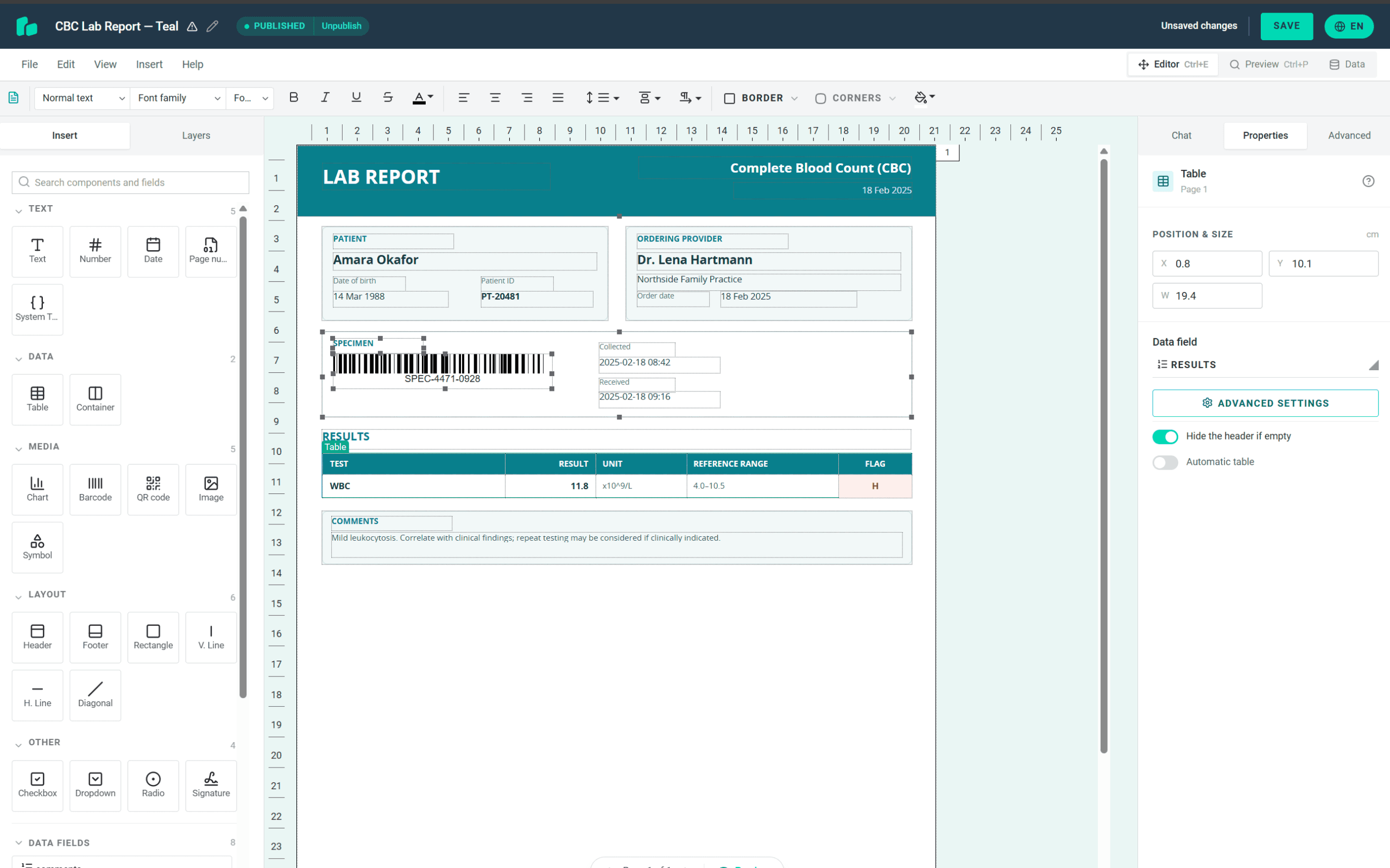
Revenue cycle vendors
Per-provider statement and claim templates, one workspace per client, editable by the client’s billing team. Batch generation for statement runs, with a callback when the batch is ready.
Lab and diagnostics platforms
Report templates per panel or per ordering organisation, with specimen barcodes and result flags driven by expressions on the reference range.
Clinics and telehealth
Referral letters, discharge summaries and after-visit summaries generated from the visit record, with the practice’s own branding and a signing step where consent is needed.
How it works
From your data to a compliant document in four steps
Your developers integrate once. Every template change after that is made in the browser by the team that owns the document.
Design the template
Build the lab report, patient statement or referral letter in the browser editor, or upload the PDF your team uses today and have it rebuilt as an editable template.
Map your data
Add fields, repeating rows for result panels and charge lines, and conditions that show a block only when the data calls for it. The expression language covers the arithmetic.
Call the API
Post the encounter, result or billing record as JSON with the template ID. Get a PDF back as base64 to keep in your own systems, or on an on-premise deployment a viewer link that opens straight into review and signing.
Change it without a release
New payer field, new reference range layout, new letterhead: the template owner edits it, publishes the version, and the next generated document uses it. Nothing to deploy.
Talk to us about your document set
Or try it free for 14 days, no card required. Mask PHI in any test data.
Let's set you up
Create your Sandbox Account
Prototype your integration today with a 14-day FREE trial. No credit card required!
Create Sandbox AccountSecurity & deployment
Compliant out of the box, deployed your way
Every cloud plan is ISO 27001 certified, HIPAA compliant and GDPR ready from day one.

Information security

Protected health data

AWS EU US Data Privacy Framework
Dedicated & on premises
Prefer your own infrastructure?
Same platform, more control. Pick a dedicated deployment close to your users, or install on premises inside your own environment.
 Virginia
 United StatesReach out →London
 United KingdomReach out →Frankfurt
 GermanyReach out →Sydney
 AustraliaReach out →
See our Terms of Service and cloud pricing.
Give your security team the answers before they ask
Meet Michal Líška. He is our pre-sales engineer and knows our service inside out. He has walked lab platforms, RCM vendors and clinics through the compliance questions and the document set, and he can tell you in one call whether a dedicated deployment is the right fit for your PHI.

FAQ
Questions health-tech teams ask before they integrate
Is PDF Generator API HIPAA compliant, and will you sign a BAA?
Yes. Actual Reports OÜ, the company behind PDF Generator API, acts as Business Associate under HIPAA and HITECH and signs a Business Associate Agreement on cloud plans as well as dedicated deployments. Contact us before you send PHI and we put the BAA in place with you. The terms are published as Annex 2 of our Data Processing Agreement. Our infrastructure is ISO 27001:2022 certified.
Where is PHI processed, and what do you store?
Standard accounts are processed in the United States. Dedicated deployments are available in the US, UK, EU or Australia, and on-premise deployment runs entirely on your infrastructure. We store the template and its static content. We do not store the data you send to generate a document, and under the BAA no PDF containing PHI is stored in our environment: request output=base64 and keep the document in your own systems.
Can our clinical or billing staff edit templates without a developer?
Yes. The template editor is drag-and-drop with data fields, repeating rows and conditional sections. Every change creates a version, and production keeps generating from the published version until you promote the next one, so an edit in progress never changes a document already going out.
Can we embed the editor in our own portal under our brand?
Yes. The editor and the Document Viewer embed in your application under your branding. A signed JWT scopes each session to one workspace, so a lab, practice or billing client sees only its own templates and documents.
Do you support barcodes for specimen and pharmacy labels?
Yes. Barcode and QR components are native to the template editor. The same template and data produce the same code on every generation, so a label that scanned in testing scans in production.
Can patients or clinicians sign generated documents?
Yes. With output=viewer the document opens in a guided review-and-sign flow that walks the signer through the form before allowing a signature. Signed documents carry an organisation seal with a trusted timestamp, and every review and signing event is written to the audit log with timestamp and IP address. Signing stores the signed document, so for consent forms and other documents containing PHI it runs on an on-premise deployment in your own environment. Explore Document Signing.
Does the output meet accessibility requirements?
Yes. Generated PDFs are tagged with logical reading order, heading structure and alt text support, meeting European Accessibility Act requirements. See PDF accessibility and compliance for detail.
How do we start?
If you have a compliance review ahead of you, book a call with our pre-sales engineer and bring the questions your security team will ask. If you want to see the product first, create a trial account: 14 days, no card required. Mask PHI in any test data you send to it.