Sales reporting
Monthly Sales Report Template
A free monthly sales report template with a table per month, product results, totals and a bar chart. Fill it in your browser and download the PDF, or connect your CRM or spreadsheet and send the report automatically on the first day of every month.
Monthly tables and totals
Chart built from your data
Any number of months and products
Scheduled by API, n8n or Make
Live template
Open the monthly sales report template in the editor
The real template is open above with sample data: a table per month with units sold, pre sold and completed for each product, a monthly total and a bar chart that compares the months. Change the data, add your logo, move blocks and switch to Preview to see the PDF. You do not need an account to try it. Create a free one when you want to keep your version and generate reports from your own sales data.
At a glance
What is a monthly sales report?
A monthly sales report summarizes how much a business sold in one month: revenue, units by product, results against target and the trend compared with earlier months. Sales managers send it to leadership, finance and the team so everyone works from the same numbers.
This free monthly sales report template turns those numbers into a one page PDF with a table per month, totals and a chart. Fill it in your browser, or send data from your CRM, ecommerce platform or spreadsheet to the PDF Generator API and have the report created and emailed on the first day of every month.
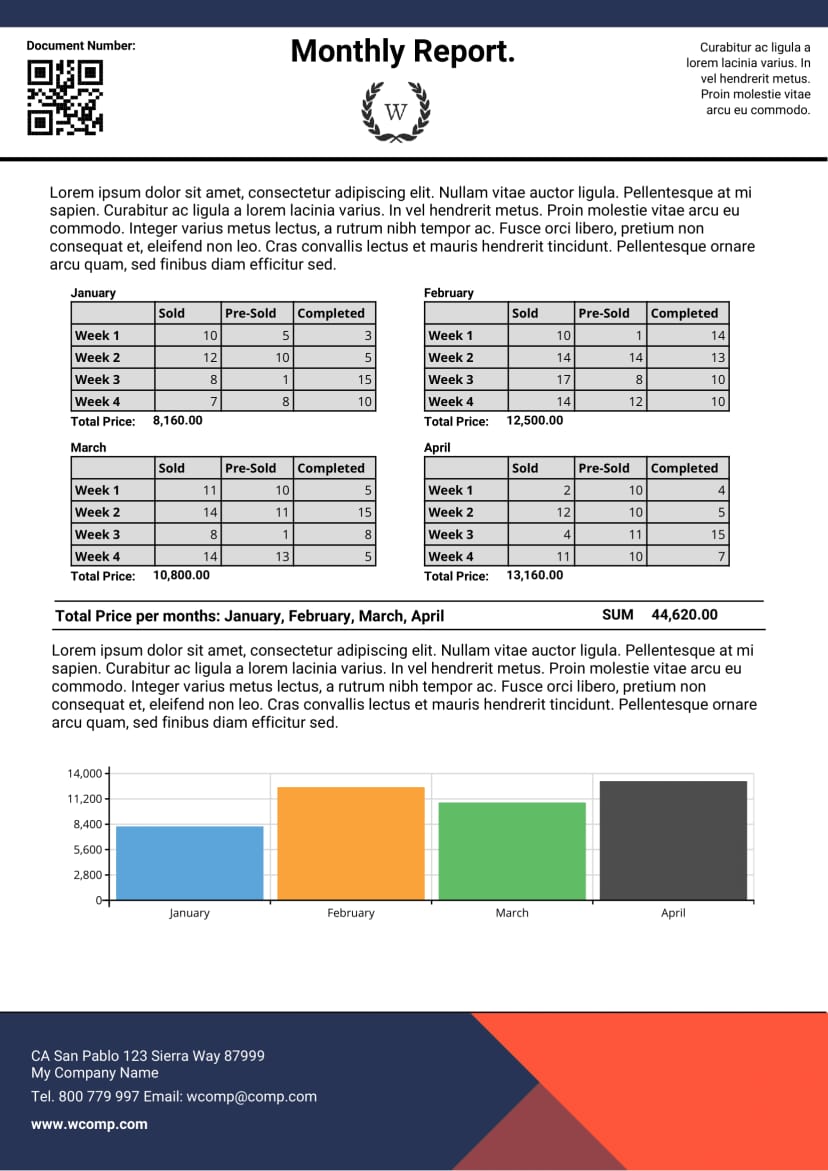
| Document type | Monthly sales report, one page A4 |
|---|---|
| Contents | Table per month, product rows, monthly totals, bar chart |
| Metrics in the sample | Units sold, pre sold and completed, total revenue per month |
| Chart | Bar chart built from your data, not a static picture |
| Months and products | Any number, sent as lists |
| Output | PDF to email, share or archive |
| Generate | REST API, n8n, Make or an AI agent through MCP |
| Price | Free template, 14 day sandbox account |
Last reviewed October 2026 by the PDF Generator API team.
What to include
Which metrics belong in a monthly sales report?
Pick the few numbers your readers act on. These are the ones most teams start with, and each one can be a field, a table column or a chart in the template.
| Metric | What it shows | How to calculate it |
|---|---|---|
| Revenue | How much the business sold | Sum of sales in the month, before or after refunds as you define it |
| Target attainment | Whether the team hit its goal | Revenue ÷ monthly target × 100 |
| Month over month growth | The direction of the trend | (This month − last month) ÷ last month × 100 |
| Units sold by product | Which products carry the month | Count of units per product, the rows of the template |
| Average order value | How much each customer spends | Revenue ÷ number of orders |
| Win rate | How well the team closes deals | Deals won ÷ deals closed (won and lost) × 100 |
| Pipeline for next month | What revenue is coming | Value of open deals expected to close next month |
Keep each number next to its comparison: last month, the same month last year or the target. A figure on its own tells the reader little.
Template contents
How is the template built?
The layout is driven by two lists in your data. One fills the monthly tables, the other draws the chart, so the report grows with the number of months and products you send.
- 01HeaderReport title, logo, document number and a QR code that can link to your live dashboard.
Balance - 02Monthly tablesOne table per month with a row per product and its units sold, pre sold and completed, plus the month’s total revenue.
line_items[ ]items[ ]total_price - 03Summary and chartThe total across all months and a bar chart that compares revenue month by month.
sales_data[ ]sale_price - 04FooterCompany name and address.
CompanyInfo
Replace the sample text blocks with your own commentary, or bind them to a field so each report carries the sales manager’s summary of the month. Rename the columns to match your business, for example booked, invoiced and paid.
Automate it
How do you send a monthly sales report automatically?
The report is the same every month, only the numbers change. Let a scheduled workflow collect them and send the PDF, so nobody copies figures into slides on the first of the month.
- Copy the template. Create a free account, open this monthly sales report template and save it to your workspace.
- Make it yours. Add your logo and colors, rename the columns and add the metrics you track in the editor, or ask the AI template builder.
- Pull the numbers. Read last month’s sales from your CRM, shop or spreadsheet and post them to
/documents/generate. Field names match the data fields above. - Schedule and send. Run the workflow on the first day of every month and email the PDF to the people who need it.
curl -X POST https://us1.pdfgeneratorapi.com/api/v4/documents/generate \
  -H "Authorization: Bearer <your-token>" \
  -H "Content-Type: application/json" \
  -d '{
    "template": {
      "id": <your-template-id>,
      "data": {
        "CompanyInfo": { "CompanyName": "WComp Ltd.", "CompanyAddr": { "City": "San Francisco" } },
        "line_items": [
          { "name": "January", "total_price": "18,450.00",
            "items": [
              { "identifier": "Product A", "sold": 120, "pre-sold": 35, "completed": 110 },
              { "identifier": "Product B", "sold": 84, "pre-sold": 22, "completed": 80 }
            ] }
        ],
        "sales_data": [
          { "item": "January", "sale_price": 18450 },
          { "item": "February", "sale_price": 21300 }
        ]
      }
    },
    "format": "pdf",
    "output": "base64"
  }'
The payload is trimmed. The full sample loads with the live template, and the API documentation lists every output option.
mcp.pdfgeneratorapi.com/mcp with a Bearer JWT.“Create the September sales report from this export and compare it with August”
See the MCP server page for setup in each client.
Related templates
More templates for sales and finance teams
The same editor and API produce the documents around the report, from the quote to the invoice and the account statement.
Reports at scale: Brikl generates sales reports, purchase orders and order details for its customers with PDF Generator API, and Gandeno sends personalized weekly market reports. See how it fits sales teams. We never store the data you send or the documents we generate, only the template structure. PDF Generator API is ISO 27001 certified and GDPR compliant.
Pricing
How much does it cost to generate sales reports?
The monthly sales report template is free, and so is the 14 day sandbox account you use to build and test the integration. In production, documents are billed by credits on a monthly or annual plan, with no fee per template. Software that wants to offer branded reports to its own customers can embed the editor through the partner program.

Sending reports to your own customers?
On a short call we look at where your data lives, which reports your customers expect and how often they go out. Your users can then brand and adjust their own report layouts in the embedded editor.
FAQ
Monthly sales report questions
What should a monthly sales report include?
Who prepares the monthly sales report?
How do I create a monthly sales report automatically?
Is the monthly sales report template free?
Can I change the chart or the columns?
Do you store the sales data I send?
Generate this template from the tools you already use
Connect the template to your workflow tool, ERP, no code app or AI agent. Every integration sends your data to the same template and returns the finished PDF, so you never retype a document.
 n8nA ready node for workflows that create and send documents.
 MakeVisual scenarios that connect the template to thousands of apps.
 ZapierGenerate a PDF whenever a trigger fires in a Zap.
 OdooDocuments from Odoo records, without QWeb or XML.
 KintoneTurn any Kintone record into a print ready document.
 AirtableAn extension that turns records into branded PDFs.
 BubbleA plugin that generates PDFs from your app data.