Shipping document
Delivery Note Template
A free delivery note template with number and date, carrier, shipper, consignee and an item list with quantity and weight. Fill it in your browser and print it as a PDF, or send order data from your shop or ERP to the API and print one delivery note per shipment.
Number, date and parties
Unlimited item lines
Filled from your order data
API, n8n or AI agent
Live template
Open the delivery note template in the editor
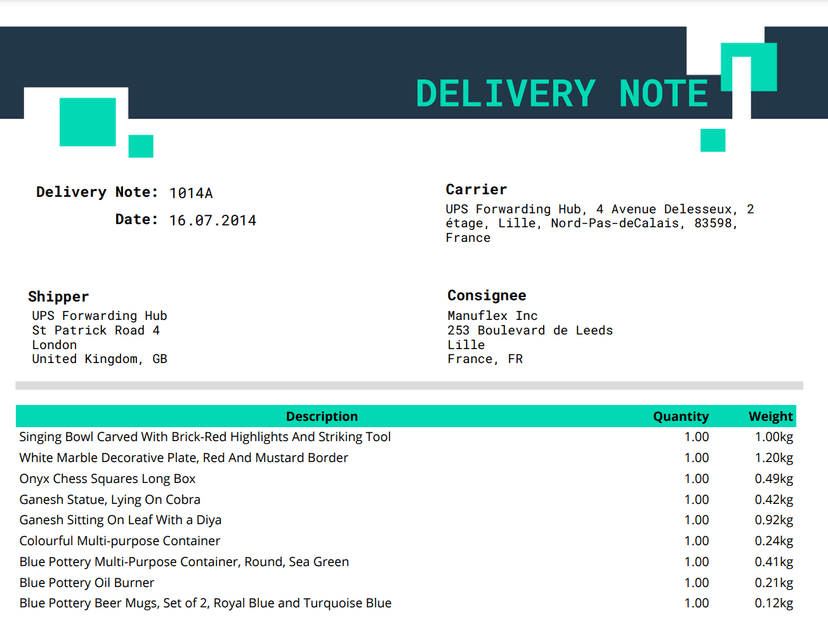
The real template is open above with a sample order: delivery note number and date, carrier, shipper, consignee, four items with quantity and weight, a QR code and a signature line. Change the data, add your logo, move fields and switch to Preview to see the PDF. You do not need an account to try it. Create a free one when you want to keep your version and generate delivery notes from your own orders.
At a glance
What is a delivery note?
A delivery note is the document that travels with a shipment and lists what is being delivered: the items, their quantities and often their weight, without prices. The receiver checks the goods against it and signs it, so it becomes the seller’s proof of delivery. It is also called a dispatch note, delivery docket or delivery slip.
This free delivery note template has the number and date, carrier, shipper, consignee and an item table that grows with every order. Fill it in your browser and preview the PDF, or send order data from your shop, ERP or warehouse system to the PDF Generator API and print one delivery note per shipment.
| Document type | Delivery note (dispatch note, delivery docket) |
|---|---|
| Issued by | The seller or the warehouse that ships the goods |
| Signed by | The receiver, as proof of delivery |
| Prices | Not shown, the invoice carries them |
| Item lines | Unlimited, sent as a list |
| Data format | Shopify style order fields: line_items, shipping_address, order_number |
| Proof of delivery | Received by and signature lines, QR code with the order |
| Output | PDF to print, email or archive |
| Generate | REST API, n8n, Make or an AI agent through MCP |
| Price | Free template, 14 day sandbox account |
Last reviewed October 2026 by the PDF Generator API team.
Template contents
What should a delivery note include?
A delivery note answers three questions for the person at the receiving door: who sent this, what should be inside and where do I sign. The template groups the details in that order.
- 01Number and dateA unique delivery note number and the dispatch date, so the receiver can match the note to the order and the invoice.
order_numberdate - 02CarrierThe company that transports the goods, with its address. The sample prints it as fixed text, so change it in the editor or bind it to a field if you use several carriers.
- 03Shipper and consigneeWho sends the goods and who receives them, with company, street, city and country.
shipping_addressbilling_address - 04ItemsOne line per item with name, quantity and weight, sent in grams and printed in kilograms. The table grows with the order, so a long delivery prints on as many pages as it needs.
line_items[ ]namequantitygrams - 05Notes and signatureA notes box for delivery instructions, a QR code for scanning at the door, and Received by and Signature lines for the receiver.
customer_memo
The field names follow the Shopify order format, so an order from Shopify or a similar shop maps almost one to one. Many businesses also add the purchase order number, the number of packages and a remarks line for damaged or missing items. Add them as fields in the editor and send them with the rest of the data.
Compare documents
Delivery note, invoice, packing list or bill of lading?
The four documents often travel together and repeat some of the same data. Each answers a different question for a different reader.
| Question | Delivery note | Invoice | Packing list | Bill of lading or CMR |
|---|---|---|---|---|
| Purpose | Confirms what was delivered | Asks for payment | Shows what is in each package | Contract of carriage and receipt by the carrier |
| Shows prices | No | Yes, with tax | No | Freight charges only |
| Main reader | The receiver at the door | Accounts payable | Warehouse and customs | Carrier, bank and customs |
| Signed on delivery | Yes, by the receiver | No | No | CMR yes, bill of lading at release |
| Free template | This page | Sales invoice | Packing list | Bill of lading and CMR |
Proof of delivery
How do you use a delivery note as proof of delivery?
A signed delivery note settles most “we never received it” disputes before they start. Four habits make it hold up.
- Number every note. Use the order or shipment number, so the note, the invoice and the carrier’s tracking all point to the same delivery.
- Check before signing. The receiver counts the packages and looks for damage while the driver is still there.
- Write down problems. Missing or damaged items go in the remarks line next to the signature. A clean signature usually means the goods arrived complete.
- Keep a copy. Store the signed note with the invoice. Scan or photograph paper copies, or collect the signature digitally with document signing.
Automate it
How do you generate delivery notes automatically?
Copy the template into your account, then send each order from your shop, ERP, warehouse system or an AI agent. The API returns one delivery note PDF per shipment, ready to print at the packing station.
- Copy the template. Create a free account, open this delivery note template and save it to your workspace.
- Make it yours. Add your logo, your carrier and your sender address, or a barcode with the order number in the editor, or ask the AI template builder.
- Send the order data. Post the JSON to
/documents/generatewith your template ID. Field names match the data fields above. - Print in batches. Generate the notes for a whole wave of orders at once, or merge each note with the packing slip into one PDF.
curl -X POST https://us1.pdfgeneratorapi.com/api/v4/documents/generate \
  -H "Authorization: Bearer <your-token>" \
  -H "Content-Type: application/json" \
  -d '{
    "template": {
      "id": <your-template-id>,
      "data": {
        "order_number": "DN-2026-00418",
        "date": "23.10.2026",
        "shipping_address": {
          "company": "Nordic Home Supplies OÜ", "address1": "Riia 142",
          "city": "Tartu 50411", "country": "Estonia", "country_code": "EE"
        },
        "billing_address": {
          "company": "Maison Verte SARL", "address1": "18 Rue Nationale",
          "city": "Lille 59000", "country": "France", "country_code": "FR"
        },
        "line_items": [
          { "name": "Oak dining chair, natural finish", "quantity": 4, "grams": 23200 },
          { "name": "Linen table runner, 180 cm, sand", "quantity": 2, "grams": 640 }
        ],
        "customer_memo": "Order #1048, thank you for shopping with us"
      }
    },
    "format": "pdf",
    "output": "base64"
  }'
The payload is trimmed. The full sample loads with the live template, and the API documentation lists every output option, including merging several documents into one PDF.
mcp.pdfgeneratorapi.com/mcp with a Bearer JWT.“Create a delivery note for order 10482 with 6 items, shipped by DPD to Lille”
See the MCP server page for setup in each client.
Logistics templates
Templates that go out with the delivery note
One order usually prints several documents. These free templates use the same editor and API, so one order record fills all of them.
Built for shipping teams: Trail.NL prints its Shopify packing documents with PDF Generator API to cut picking mistakes, and platforms such as Veeqo generate their shipping documents with it. See how it fits logistics teams. We never store the data you send or the documents we generate, only the template structure. PDF Generator API is ISO 27001 certified and GDPR compliant.
Pricing
How much does it cost to generate delivery notes?
The delivery note template is free, and so is the 14 day sandbox account you use to build and test the integration. In production, documents are billed by credits on a monthly or annual plan, with no fee per template. Warehouse, ERP and ecommerce software that wants to offer document printing to its own customers can embed the editor through the partner program.

Printing delivery notes from your shop, ERP or WMS?
On a short call we look at where your order data lives, which documents you print for every shipment and how many you print per day. Your users can then adjust their delivery note, packing slip and invoice layouts in the embedded editor under your brand.
FAQ
Delivery note questions
What is the difference between a delivery note and an invoice?
Who signs the delivery note?
Is a delivery note the same as a packing slip?
Is the delivery note template free?
Can I change the carrier, add a barcode or my logo?
Do you store the order data I send?
Generate this template from the tools you already use
Connect the template to your workflow tool, ERP, no code app or AI agent. Every integration sends your data to the same template and returns the finished PDF, so you never retype a document.
 n8nA ready node for workflows that create and send documents.
 MakeVisual scenarios that connect the template to thousands of apps.
 ZapierGenerate a PDF whenever a trigger fires in a Zap.
 OdooDocuments from Odoo records, without QWeb or XML.
 KintoneTurn any Kintone record into a print ready document.
 AirtableAn extension that turns records into branded PDFs.
 BubbleA plugin that generates PDFs from your app data.