People looking for a barcode generator usually fall into one of two camps. The first camp needs a barcode image right now: one EAN for a product listing, one Code 128 for a warehouse bin, done in a browser and downloaded in a minute. The second camp needs barcodes to appear automatically, on every shipping label, invoice, or ticket their system produces, without anyone opening a design tool.
Most “top barcode generator” lists only serve the first camp. This one covers both, because in practice the two problems meet: the barcode you make by hand today is the barcode you need generated at scale six months from now.
One more reason this matters in 2026: the barcode itself is changing.
Before you pick a tool: 1D, 2D, and Sunrise 2027
Linear (1D) barcodes like EAN, UPC, and Code 128 encode a short identifier and need a line of sight scanner. 2D codes like QR, Data Matrix, and PDF417 hold far more data in less space and can carry links, batch numbers, and expiry dates in a single symbol.
The industry is moving toward 2D. GS1’s Sunrise 2027 initiative aims for retailers worldwide to be able to scan 2D barcodes at the point of sale by the end of 2027, and 48 countries covering roughly 88 percent of global GDP are in the transition. The benefits are already measurable: Woolworths in Australia has scanned 2D codes at the register since 2019 and reports up to 40 percent less food waste, because a code that carries the batch and expiry date lets the till block expired items automatically. That makes 2026 the preparation year: brands are starting to print QR codes and Data Matrix symbols alongside the familiar EAN or UPC, not instead of it. The classic retail barcode is not going away, but if you are choosing tooling now, 2D support is no longer optional.
With that in mind, here are the five tools worth your time in 2026.
The top 5 barcode generators at a glance
| Tool | Type | Key Formats | Commercial Free | API | Best For |
|---|---|---|---|---|---|
| TEC-IT | Web generator | 100+ incl. niche formats | No (private use only) | Paid subscription | Format coverage, private use |
| Orca Scan | Web + free API | 12 common + SVG export | Yes | Free, rate limited | Commercial use, simple hosted API |
| Canva | Design tool | 9 linear formats | Yes (account required) | No | Barcodes inside designed assets |
| bwip-js | JS library | 100+ MIT licensed | Yes (self hosted) | Self hosted | Developers, full in-stack control |
| PDF Generator API | Document API | 30+ as vector graphics | 14 day trial | Full REST API | Barcodes inside auto generated documents |
1. TEC-IT Free Online Barcode Generator
TEC-IT is the tool most people land on first, and for good reason: no other free barcode generator comes close on format coverage. Beyond the usual Code 128, EAN, UPC, and QR, it handles GS1-128, Data Matrix, PDF417, Aztec, postal codes for a dozen countries, ISBN, pharmaceutical codes, and payment symbols like Swiss QR and EPC QR. If a barcode standard exists, TEC-IT probably renders it.
The catch sits in the terms of use. Free output is for private, non commercial use only; commercial use requires written approval from TEC-IT. Many people printing free TEC-IT barcodes on product labels are technically violating the terms without knowing it. Free downloads are also raster only (PNG, JPG, GIF); vector SVG output and the API are reserved for the paid subscription, which starts at 199 euro per year for 500 barcodes a month.
Strengths
- Broadest symbology coverage of any free web barcode generator
- No signup and no watermark
- Handles niche standards (postal, healthcare, banking) that other tools skip
Limitations
- Free tier is explicitly non commercial
- No free vector output, which matters for print
- API and SVG require an annual subscription with a long cancellation notice
Best for: checking what a symbology looks like, one off private use, or teams ready to pay for the full format library.

2. Orca Scan Barcode Generator
Orca Scan is the practical counterweight to TEC-IT. The web generator covers the 12 types most people actually need (QR, Data Matrix, EAN, UPC, Code 128, Code 39, Code 93, PDF417, ITF, Aztec) and exports PNG, JPG, PDF, and SVG, all free, with no signup, no watermark, and no commercial use restriction.
Developers get a bonus: a genuinely free hosted image API. A simple GET request returns a barcode image, no API key needed, rate limited at 15 requests per second. Errors even come back as readable text rendered inside the image, so a broken img tag never leaves a blank hole in your page. Orca Scan funds this through its separate inventory tracking platform, which is also why the generator can stay free.
Strengths
- Free SVG export for clean print results
- Free image API with generous limits and no key management
- No commercial use restrictions
Limitations
- 12 symbologies only, no GS1-128
- The free API comes with no SLA, so heavy production use rests on goodwill
- No document generation; you get an image and place it yourself
Best for: anyone who needs a commercial safe free barcode today, and developers who want barcode images from a URL without running anything.

3. Canva Barcode Generator
If the barcode is going onto something designed, a label, a flyer, or packaging, Canva keeps the whole job in one place. The barcode generator supports nine linear formats including Code 128, EAN-13, EAN-8, UPC, and Code 39, and drops the result straight into your design next to your artwork, then exports through Canva’s normal PNG, JPG, or PDF output.
The trade off is precision and depth. There are no 2D formats in the barcode tool (Canva’s separate QR generator makes static, link only QR codes), no GS1-128, and no control over bar width ratios or quiet zones, the details that decide whether a code passes retail print compliance. A free Canva account is required, and SVG export needs Canva Pro.
Strengths
- Barcode and label design in one tool
- Familiar to non technical teams
- Free tier is fine for occasional use
Limitations
- Linear codes only, no Data Matrix, PDF417, or Aztec
- No precision controls for GS1 print compliance
- Account required, no API
Best for: marketing and operations people putting a standard retail barcode onto a designed asset without leaving their design tool.

4. bwip-js
For developers who want full control, bwip-js is the reference answer. It is a pure JavaScript port of the Barcode Writer in Pure PostScript project, MIT licensed, actively maintained (version 4.11.2 shipped in July 2026), and it renders more than 100 symbologies — effectively every barcode standard in circulation, including the GS1 Digital Link codes at the center of the Sunrise 2027 transition.
It runs in the browser, Node.js, React, React Native, and Electron, and outputs PNG or SVG. Because you host it yourself, there are no rate limits, no per barcode fees, and no dependency on someone else’s uptime. The flip side is that everything else is on you too: sizing, print resolution, and the plumbing that gets the barcode into whatever document needs it.
Strengths
- 100+ symbologies under a permissive MIT license
- Actively maintained and battle tested
- No rate limits or usage fees, ever
Limitations
- Code only, nothing here for non technical users
- You own hosting, scaling, and print quality concerns
- Produces images, not finished documents
Best for: engineering teams that want barcode generation inside their own stack with zero licensing friction.

5. PDF Generator API
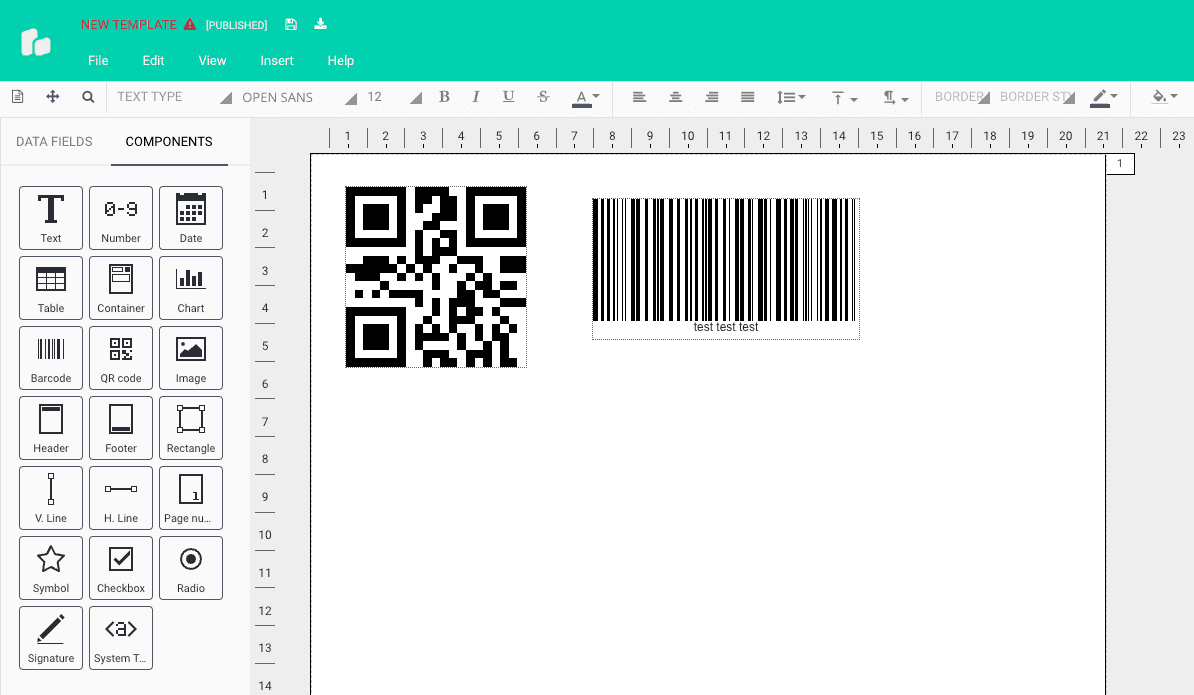
Every tool above hands you a barcode image and leaves the rest to you. PDF Generator API works from the other direction: it generates the entire document, shipping label, invoice, packing slip, ticket, or certificate, with the barcodes already inside. You drag a barcode component into the drag and drop template editor, bind it to a field in your data, and every document that comes out of the API carries its own code.
The focus here is barcodes inside documents rather than standalone barcode images, though a free browser based barcode tool is on our roadmap and coming soon to the Actual Reports free tools page, where a free QR code generator is already live. QR codes also have their own dedicated API today: send the content, set a color, add a logo, and get back an image as a file or base64 string.
The barcode component supports over 30 formats: the Code 128 family including GS1-128, EAN and UPC, Code 39 and 93, ITF, MSI, Codabar, postal codes (POSTNET, IMB, KIX and others), pharmacodes, and on the 2D side QR, Data Matrix, PDF417, and Aztec. Barcodes render as vector graphics by default, so they stay sharp at any print size, exactly what retail and logistics scanning requires.
Plans start at 8 euro per month, or 80 euro per year on annual billing (17 percent less). Every plan includes the template editor and QR Code API, and the 14 day trial comes with unlimited test documents. The platform is GDPR compliant and ISO 27001 and HIPAA certified, with US, Australia and EU data residency available, which tends to decide the question for European logistics and healthcare teams.

Strengths
- Barcodes generated inside finished, production ready PDFs
- 30+ formats rendered as vector graphics, plus a standalone QR endpoint
- GDPR, ISO 27001, and HIPAA compliance with US, Australia and EU hosting
Limitations
- Built for barcodes inside documents, not standalone image files. A free browser barcode tool is coming soon to the Actual Reports free tools page
- Paid product after the 14 day trial
Best for: teams that need barcodes on documents their software generates automatically, especially where compliance and print quality are non negotiable.

Honorable mentions
BarcodeAPI.org is a free, open source hosted API that turns a URL like barcodeapi.org/api/128/abc123 into a PNG. Great for prototypes; PNG only output and unpublished usage limits make it a harder sell for production.
Zint is the standard open source desktop answer: a free C library with a GUI, 50+ symbologies, no internet connection required. Worth knowing if your barcodes must be generated fully offline.
Wrapping up
Choosing a barcode generator in 2026 comes down to where the barcode ends up.
If it ends up in your hand, a label you print once, a code you paste into a listing, use Orca Scan, or TEC-IT if you need an unusual format and the use is private. If it ends up in a design, Canva keeps everything in one tool. If it ends up in your codebase, bwip-js gives you every format with no strings attached.
And if the barcode ends up on documents your system generates every day, labels, invoices, tickets, that is the problem PDF Generator API was built for, with Sunrise 2027 making the 2D part of the job more urgent every quarter.
Want to see how barcodes fit into your document workflow? Start a free 14 day trial or book a call and bring a real label or invoice to the call.
Frequently Asked Questions
What is the best free barcode generator for commercial use?
Orca Scan is the strongest free option for commercial use. It exports SVG, PNG, JPG, and PDF with no account required and no commercial use restrictions. It also offers a free hosted API for developers. TEC-IT has broader format coverage but its free tier is restricted to private, non commercial use only.
What is GS1 Sunrise 2027 and does it affect my barcodes?
GS1 Sunrise 2027 is an industry initiative to ensure that retail point of sale systems worldwide can scan 2D barcodes (such as QR and Data Matrix) by the end of 2027. It does not eliminate 1D barcodes like EAN or UPC, but it means brands should start printing a 2D code alongside their existing linear barcode. If you are choosing barcode tooling in 2026, picking a generator that supports Data Matrix and QR is no longer optional.
Can PDF Generator API generate GS1-128 barcodes inside a PDF?
Yes. PDF Generator API supports GS1-128 as part of its Code 128 family, alongside EAN, UPC, Data Matrix, QR, PDF417, Aztec, and more than 30 other formats. All barcodes are rendered as vector graphics by default, which means they stay sharp at any print size and pass retail and logistics scanning requirements.
What is the difference between a barcode generator and a barcode API?
A barcode generator is a web tool or desktop application where a person enters data, chooses a format, and downloads an image. A barcode API is a service your application calls programmatically to produce barcode images or documents at scale without manual input. Tools like Orca Scan offer both. PDF Generator API focuses on the API side, embedding barcodes directly into the documents your system generates automatically.