Your technicians finish the job on site, and then the paperwork starts: the service report, the completion certificate, the quote for the follow-up work, the invoice. The people who know what those documents must say are in the office, not in engineering, and most of you do not have an engineering team at all. You want the document generated the moment the job is marked complete in the system you already run, with the photos and the signature on it, and a template your office can change on a Tuesday afternoon. Connect from Make, Zapier, HighLevel or Airtable, or from your own app if you have one.
PDF Generator API
Work orders, job sheets, service reports and quotes generated from your field service app
Trades businesses, service contractors and the field service software they run generate work orders, job sheets, service reports, job completion certificates and quotes from the job record the technician already fills in on their mobile app. The photos they took and the customer’s signature go on the document. Templates are edited in the browser by the office, not by a developer, and every branch or franchise carries its own branding.
Work order, job sheet, service report and quote from one job record
The technician's photos and the customer's signature on the document
Per-branch branding through workspaces for franchises and multi-site firms
Connect from Make, Zapier, HighLevel or Airtable, no developer needed
14-day free trial. No credit card required.

1,500+
companies trust us
6M+
documents generated monthly
4.5★
Information security
Trusted by teams featured in our case studies


Job management, dispatch and fleet software
You sell to the people above, and every one of your customers wants their own logo, their own checklist and their own wording on the document your app produces. A generic printout does not survive contact with a thousand customers. Per-customer templates live in separate workspaces, and you can embed the template editor inside your product so a customer changes their own completion certificate without opening a ticket with you. That is how Fleet Complete runs it.

The job finishes at 16:40. The paperwork finishes at nine.
The technician takes the photos, works through the checklist in the app and gets the customer’s signature on the screen. Then, at home, the same information gets typed into a Word document, the photos get pasted in one by one, the file gets saved as a PDF and emailed the next morning. The quote is the same story: measured on site, priced in the van, written up that evening, sent the day after. By then the customer has two other quotes on the table.
Multiply that by every job and it is the largest block of unbilled time in the business. It also does not scale: one installer platform we work with saw quote volume rise 62% in three months and found that Word could not keep up.
The document is the last thing the customer sees from you. It should not be the slowest thing you produce.
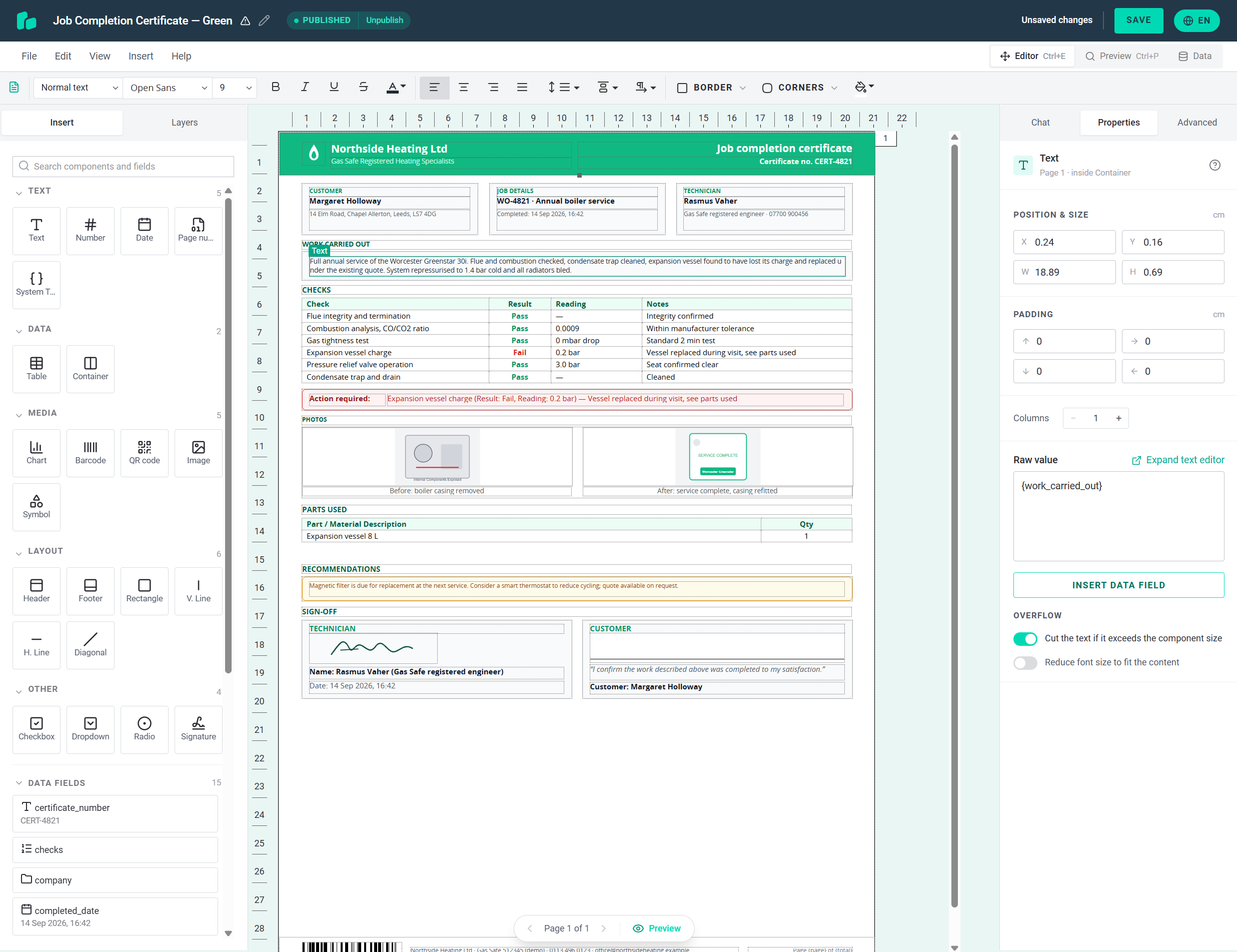
Job documents the office owns, generated when the technician taps Complete
PDF Generator API merges your job, customer and site data with templates designed in a browser-based editor. Connect it once, from your own app or from an automation on the job system you already use. From then on, marking a job complete produces the service report, the completion certificate or the quote in seconds, with the photos in place and the signature captured.
The office owns the layout. When a new safety check is added to the checklist, a branch changes its logo or the payment terms on the quote change, someone in the office edits the template and the next job uses it. Nothing goes into a development queue. One job record can feed every document, so the customer name, the site address and the line items agree across the work order, the report and the invoice.

Documents
Job documents you generate from one API
There is no fixed list of document types. A template is whatever you lay out in the editor: the certificate your trade body expects, a one-page job sheet for the van, a twelve-page inspection report with photos, a quote in your brand. If you can describe it, the same API generates it from your job data, with photos, signatures, conditional sections and per-branch branding available in every one. The nine below are the ones field service teams ask us about most, and every one of them can come from the same job record.

Work order
Customer, site, requested work, assigned technician, scheduled window, parts to bring. Generated at dispatch so the technician has it on the phone before arriving.
Job sheet
The one-pager the technician works from: tasks in order, materials used, time on site, notes. Filled from the app as the job progresses, invoiced from by the office.
Service report
What was checked, found, done and recommended. Photos of the fault and the fix sit beside the text; sections appear only when the payload has something to say.
Job completion certificate
Customer, technician, checklist with passes and fails, photos, signature, timestamp. The document you hand over at the door and the one that ends up in the customer’s file.
Quote and estimate
Line items, VAT and total, terms and validity, optional extras. Generated from the survey on site so it can be accepted before the technician leaves.
Invoice
Built from the same job record as the quote and the job sheet, so the line items match. Payment terms and bank details come from the branch’s workspace.
Inspection checklist and test record
Pass and fail items, readings, serial numbers, photo evidence per item. A repeating section grows with the items inspected, and a summary shows the failures first.
Risk assessment and method statement
Hazards, controls, people responsible, sign-off. Generated per job from a library of standard hazards in your data, with the site-specific ones added by the technician.
Maintenance agreement and service contract
Scope, visit schedule, price, terms. Generated from the customer record and opened for signature, so the contract is signed before the first visit is booked.
Dwellow saves two to three hours per job on installer paperwork
Dwellow connects homeowners in the UK with installers of heat pumps, solar panels and batteries, and its platform runs the whole installation from the first consultation to ordering materials and managing contractors. Quotes and the grant paperwork were produced in Word by hand, and when quote volume rose 62% in three months that stopped being possible. Integrating PDF Generator API took a token and an API call. The office adjusts the templates itself in the editor, with no technical staff involved, and the team now saves two to three hours per job that used to go on documents.
Customers sometimes receive quotes from major energy providers in a Word document. When we send a properly formatted PDF, it immediately makes us look more professional.
Adam Raw, Co-Founder, Dwellow

Photos from the job, signature at the door
Field documents carry two things an invoice does not: pictures and a signature. Both come from the technician’s phone and both belong on the PDF, not in a separate attachment.
Photos are passed in the job data as a URL or a base64 string, and the Image components in the template render them where the layout puts them: a before-and-after pair, a photo of the serial plate, a grid of the completed installation. Conditional content hides the slots you did not fill, so a job with two photos does not print two empty boxes.
For the signature you have two routes. If your app already captures a signature as an image, pass it in like a photo. If you want a signed original, open the document through the viewer link and the certificate appears in a review-and-sign flow on the phone. The customer confirms their details and signs into their own field, and the signed PDF is sealed with a certificate-backed organisation seal and a trusted timestamp, so it opens in any PDF reader without a warning. The audit trail records who signed, when, and from which IP address.
- Photos as URLs or base64 in the payload, rendered inside the PDF as the template positions them
- Conditional content for optional photos and sections, so nothing prints empty
- Signature as a captured image, or a signed original through the viewer with a sealed, timestamped PDF
- Drawn-signature step can be switched off for one-tap acknowledgements at high volume

Every franchise, its own branding
A franchise group has forty branches and one head office. A national contractor trades under three brands. A facilities company works under its clients’ names on their sites. In every case the document has to carry the right logo, the right contact details and sometimes the right wording, and in most job systems that means forty copies of the same report drifting apart.
Workspaces solve it. Each branch, brand or client gets its own workspace with its own logo, footer, colours and terms, and the API call names the workspace. The same work order template renders under the right branch every time. Head office keeps the master template; a branch that needs a different clause edits its own copy without touching anyone else’s. Access is scoped with a JWT, so a branch only ever sees its own templates. If you build the software, embed the editor and your customers maintain their own templates inside your product, as Fleet Complete does.
- One workspace per branch, brand or client, named in the API call
- Master templates at head office, local edits where they are needed
- JWT-scoped access, so each branch sees only its own templates
- Embedded editor for software vendors, or a shared template set the office maintains for everyone

No developer required
Connect the job management system you already run
Most trades businesses do not have an engineering team, and they do not need one here. When a job is marked complete in the system you use today, an automation sends the job data to PDF Generator API and the document comes back. Job management tools with a Zapier or Make app, such as ServiceM8, Jobber and Simpro, connect this way. So does a spreadsheet, a CRM or a form on your website. If you do build your own app, the REST API is one call.
Automation
Make
A heating engineer marks the boiler service complete in the job app. A Make scenario picks up the job, generates the service report with the checklist and photos, and emails it to the customer before the van has left the street.
Automation
Zapier
A job is completed in ServiceM8 or closed in Jobber, or a job is raised in Simpro. The Zap sends the job data to PDF Generator API, files the completion certificate in the customer’s folder in Google Drive, and attaches the link back to the job.
CRM
HighLevel
A homeowner fills in the quote request form on a roofing company’s site. The HighLevel workflow sends the contact and form fields to PDF Generator API through a webhook and attaches the branded quote to the follow-up email.
Database
Airtable
A landscaping firm runs its job board in Airtable. At the end of the day the office selects the jobs finished today and generates the work orders and service reports from the extension, in one go, without leaving the base.
Also available: n8n, Kintone, Odoo, Bubble, Adalo, Xano and the Postman collection. Or capture the job details on a form we host and generate the document from the submission with Web Forms.
Quote it in the van, get it signed before you leave
The best time to close a job is while you are standing in the customer’s kitchen. Most quoting tools cannot help with that, because the quote gets written up back at the office. Here the survey data goes in from the phone, the priced quote comes back in seconds, and with output=viewer it opens on the same phone for the customer to read and accept. They sign into their own field, the signed copy is sealed and timestamped, and the office sees it before the technician has reached the next job.
For the enquiries that arrive online, Web Forms hosts the quote request form for you and generates the document from the submission. Turn the fields on your quote template into a form in one action, publish it, and every submission produces a branded PDF quote or a survey booking confirmation with no one retyping anything.

Fleet Complete lets thousands of fleet customers design their own job documents
Fleet Complete’s field worker app dispatches tasks to plumbers, couriers and other mobile workers, who collect the customer’s name and signature, a timestamp, a package count or a photo as they complete the job. Customers expected a document to come out of that, and a generic printout did not satisfy them: they wanted their own branding and their own choice of data on the page. Fleet Complete embedded the PDF Generator API template editor white-label inside its own product, so each customer edits its own templates without leaving Fleet Complete’s environment. The integration took a few days, and changes to the data model since then have taken under half an hour.
We have used PDF Generator API for a couple of years now and I don’t think we have had a single problem with it so far. It works as intended. Considering that our clients expect the documents to roll out as soon as they finish their job, this is a major achievement.
Kristjan Annus, Head of R&D, Fleet Complete Europe

How it works
From “job complete” to a signed document in four steps
Connect once, from your own app or from an automation. After that, every new checklist line, branch logo or wording change is a template edit the office makes in the browser.
Design the template
Build the work order, service report or quote in the browser editor, with photo and signature fields where you want them. Or upload the form you print today and have it rebuilt as an editable template.
Send the job data
When the technician taps complete, your app posts the job as JSON, or Make, Zapier, HighLevel or Airtable does it for you. Photos travel as URLs or base64. Name the workspace for the branch whose branding the document should carry.
Get the document back
Receive a PDF to email or file, or with output=viewer a link that opens the certificate or quote on the technician’s phone for the customer to sign at the door.
Change it without a release
A new safety check, a new franchise logo, new payment terms on the quote: the office edits the template and the next job uses it. Nothing for a developer to deploy.
Try for Free
Generate your first job completion certificate today
Start a 14-day free trial with no credit card, open the certificate template in the editor, and send your first job payload with a photo and a signature from the sandbox.
Try for FreeSecurity & deployment
Compliant out of the box, deployed your way
A job document carries a customer’s name, home address, phone number, photos of the inside of their property and their signature. We process that data on ISO 27001:2022 certified infrastructure under a signed Data Processing Agreement. We do not store the data you send or the document we generate unless you ask us to, and log files never contain your payload. Dedicated deployment in Frankfurt, London, Virginia or Sydney, or on premises, for contractors and franchise groups who need data to stay in-region.

Information security

Protected health data

AWS EU US Data Privacy Framework
Dedicated & on premises
Prefer your own infrastructure?
Same platform, more control. Pick a dedicated deployment close to your users, or install on premises inside your own environment.
 Virginia
 United StatesReach out →London
 United KingdomReach out →Frankfurt
 GermanyReach out →Sydney
 AustraliaReach out →
See our Terms of Service and cloud pricing.
Michal Líška is our pre-sales engineer. The useful version of this call is not a tour of the editor. It is you sending him the work order, service report or certificate you use today, and him rebuilding it as a template while you watch, with a photo and a signature in it and your data behind it. That answers the question you actually have, which is whether your documents work here and how much of the evening they give back.
Book a demo call with Michal ›

Questions we get
What the office will ask
Can the technician’s photos go on the document?
Yes. Pass each photo as a URL or a base64 string in the job data and the Image components in the template render them in the layout, sized and cropped as you designed. A before-and-after grid, a photo of the serial plate, a picture of the completed installation: whatever your app captures. Text stays selectable, so the certificate is still a real document rather than a scan.
How does the customer sign at the door?
Two ways. If your app already captures a signature as an image, pass it as a photo field and it is placed on the document. If you want a signed original, request output=viewer: the certificate or quote opens in a review-and-sign flow on the technician’s phone, the customer signs into their own field, and the signed PDF is sealed with a certificate-backed organisation seal and a trusted timestamp. The audit trail records who signed, when, and from which IP address. For high volumes you can turn off the drawn-signature step and take a one-tap acknowledgement instead.
We have twelve branches with different logos. Do we need twelve templates?
No. Keep one set of templates and put each branch’s branding in its own workspace, with its own logo, footer and contact details. Your API call names the workspace, and the same work order template renders under the right branch. If a branch needs a different clause or a different checklist, that branch edits its own copy without affecting the others.
We don’t have a developer. Can we still use it?
Yes. If your job management system has a Zapier or Make app, a completed job can trigger the document without any code, and the PDF is emailed or filed automatically. HighLevel connects through workflow webhooks, and Airtable through our extension. If you would rather capture job details on a form, Web Forms hosts the form for you and generates the document from the submission.
Can we reuse the work order and certificate forms we print today?
Yes. Upload the PDF or Word file and we rebuild it as an editable template, then bind your job fields to it. Forms with a fixed layout, such as a certificate that has to match a printed version, work well this way: the layout stays as it was and your data, photos and signature fields sit on top of it.
Can the quote go out before the technician leaves the site?
Yes. When the survey is done, the app sends the measurements and line items and the quote comes back in seconds. Email it as a PDF from the van, or open it with output=viewer so the customer can accept and sign it on the spot.
Where is our data processed, and do you keep the documents?
Shared cloud runs in the US. Dedicated deployment runs in the region you choose: Germany, the UK, the US or Australia. On premises runs inside your own infrastructure. We do not store your payload or the generated file unless you use document storage, in which case signed documents are kept encrypted for the retention period on your plan, or in your own S3, Azure, Dropbox or Google Drive.
Can the work order, the service report and the invoice come from the same job record?
Yes. One job payload can feed every template, so the customer details, the tasks and the line items agree across all of them. Generate them one at a time as the job moves through its stages, or send them as a batch and get one merged file back for the office.
Something your office or your software vendor will ask that we have not answered here?