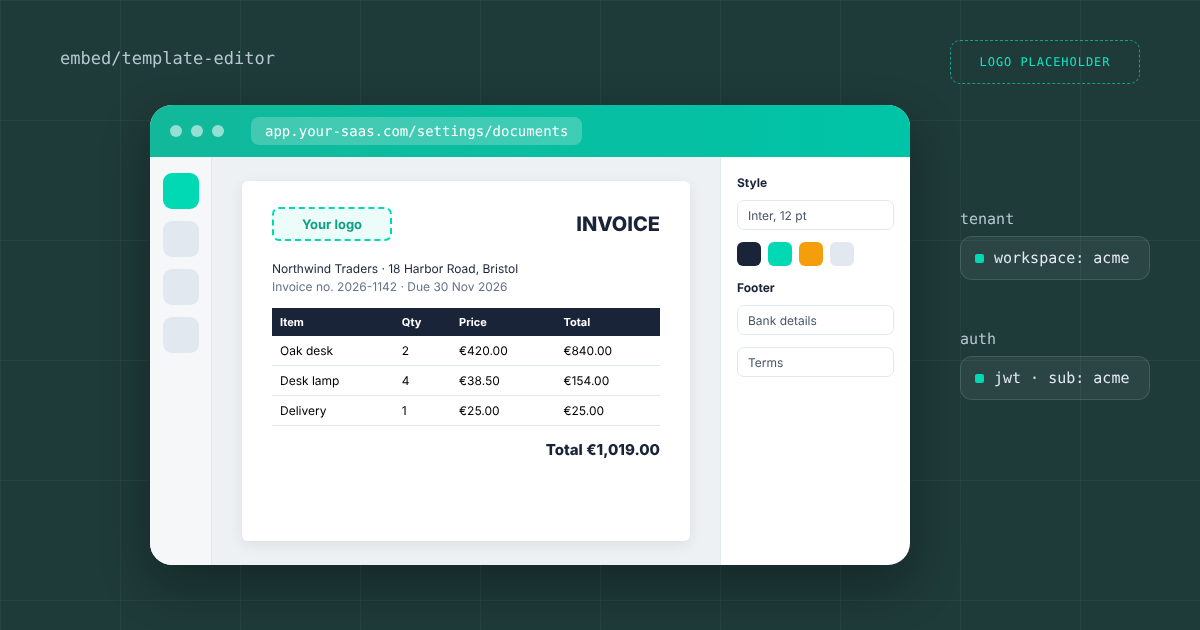
Do your customers ask to change their own invoices, packing slips or quotes? If you run a SaaS product, the first request is usually a logo, then a different footer, then an extra column only one customer needs. Every request lands on your developers, and every template change becomes a release. A white label PDF template editor moves that work to your customers. You embed our drag and drop editor inside your app, each customer edits the templates in their own workspace, and your backend keeps generating the PDFs through the same API. This article shows how the embedded editor works, how it keeps tenants apart, what it costs, and when you do not need it.
Why per customer templates break a hard coded PDF setup
Most products start with one template rendered from HTML or a reporting library. That holds until the second customer wants a different layout. From there you either fork the template per customer or add flags for every variation, and both paths end with developers editing layout code. OrderEase, a B2B ordering platform, put a number on it after moving template work to their customers: their CTO estimates it saves around six hours of support time per onboarding. The goal is simple: customers change the look of their documents, and your code only supplies the data.
How the embedded template editor works
You open the editor with one API call and show the result in your app. Your backend asks for an editor URL for a template, and the response is a unique URL that already carries the authentication. You load it in an iframe or redirect the user to it. Your customers never create a PDF Generator API account and never see a login screen.
- Your backend signs a JSON Web Token with your API key and secret. The
issclaim is your API key,subis the customer’s workspace, andexpis a short expiry. - It calls
POST /templates/{templateId}/editorwith that token and an optionallanguage:en,et,cs,sk,ruorde. - Your frontend loads the returned URL in an iframe. The iframe route needs the browser to allow third party cookies, so offer a redirect as the fallback.
- When the customer saves, the template is stored in their workspace. Your next generation call for that workspace uses the new layout.
A minimal request looks like this. The token is signed on your server, never in the browser:
curl -X POST "https://us1.pdfgeneratorapi.com/api/v4/templates/<template-id>/editor" \ -H "Authorization: Bearer <jwt-signed-on-your-server>" \ -H "Content-Type: application/json" \ -d '{ "language": "en" }'Two details save a round of debugging. First, the workspace comes from the token’s sub claim, so a customer cannot switch to another workspace by editing a URL. Second, keep exp short and request a fresh editor URL every time the user opens the editor, instead of storing one. The API reference lists the optional fields, such as sample data to show in the editor while the customer designs.
One workspace per customer keeps tenants apart
Multi tenant isolation comes from workspaces. Each customer gets a workspace, and a workspace sees its own templates plus the default templates of your organization, nothing else. To give every new customer a starting point, set a template’s access type to Organization in Page Setup. It then appears in the editor’s New menu, and the customer copies it into their workspace and changes it there. Your defaults stay untouched, so a customer cannot break the template another customer uses.
Customers who already have a layout can import an existing PDF as the template background. Editable areas are detected automatically, and the customer places data fields on top. The AI template assistant covers the other end: the customer describes the document or uploads a PDF or DOCX, and a first draft of the template is built for them. A first template takes a few minutes, and every text, table and image in it can be a placeholder that your backend fills with data.
What your customers can change in the template
The editor is a full template designer, not a form with a logo field. Customers move fields by drag and drop, and developers on your side can switch to HTML and CSS for fine control. The same template renders through the generation API at any volume. The capabilities customers use most:
- Dynamic tables that repeat one row per item, with page breaks, so an invoice with 3 lines and one with 40 lines come from the same template.
- Conditional formatting and hiding, for example a VAT line that only appears for EU customers.
- An expression language for calculations such as discounts, subtotals and dates.
- Barcodes, QR codes, charts, images, and headers and footers on every page.
- Six editor languages, set per request, so each customer sees the editor in their own language.
Dynamic tables are where many design first tools stop. Orshot, for example, writes in its own comparison that it has no table element, so line items are fixed rows. If your customers send documents with a variable number of lines, test that case first with any tool you evaluate.
What the embedded editor costs
The embedded editor is included from the Basic plan, which costs €88 a month or €880 a year for 5,000 credits. One credit is one document of 1 to 5 pages. You pay for document volume, not for tenants. Starter includes 10 workspaces, and from the Professional plan workspaces are unlimited, which is the plan to look at once you onboard customers in bulk. Every account starts with a sandbox: the full API free for 14 days, up to 50 credits, no credit card. The full table is on our pricing page.
SaaS teams that already let customers edit templates
These are customers who embedded the editor in their own product. Each quote is from their published case studies:
- Veeqo, an inventory and fulfillment platform, has run it in production for more than five years. Calum McClune, Technical Team Lead: “The reason we chose PDF Generator was the template editor. Building our own would have wasted our development time.”
- OrderEase lets its customers copy and edit the default templates, and the integration has gone untouched for years. Rob Tigwell, CTO: “It probably saves us around six hours of support time per onboarding.”
- Stubber runs 213 templates across its client base. Luke Steffens, Solutions Architect: “It would be really hard without this for us to build actual PDF documents for clients.”
- Paragon ERP moved to the editor after being charged thousands per template change by its previous setup.
When you do not need an embedded editor
If all your customers get the same document and only the data changes, you do not need an embedded editor. Keep one template in your own workspace and call the generation API. The same holds when your team, not your customers, owns every layout change and changes are rare. The editor pays off once template requests reach your support queue every week, or when customers expect to manage their documents themselves, which is common in ERP, ordering and fulfillment software.
What else the same integration covers
The workspaces and templates you set up for the editor work with the rest of the API. Customers can collect data with web forms, send the finished document for review and sign, output accessible PDF/UA files, or produce compliant e-invoices from the same invoice data. If you prefer to keep generation outside your code, the MCP server, n8n and Make integrations call the same templates. Through the MCP server, an AI agent can also create new templates for you.
To try it with your own documents, start a free sandbox account, read how the embedded template editor fits your product, or book a call with Michal to walk through workspaces and tokens for your setup.