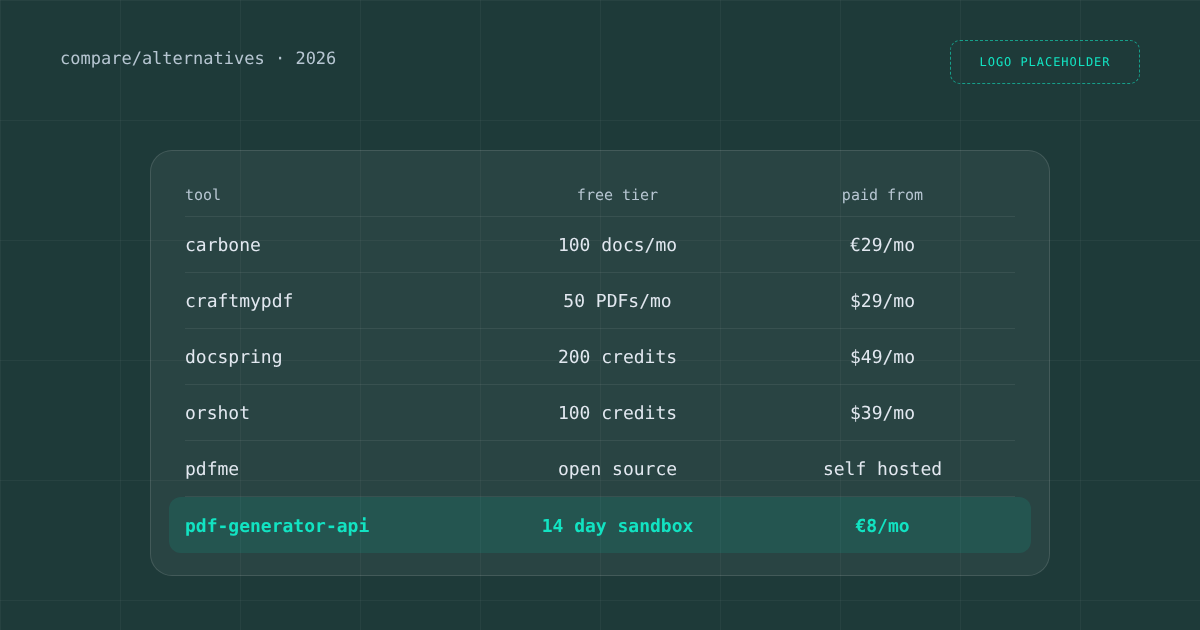
Looking for PDF Generator API alternatives? The five tools buyers compare us with most are Carbone, CraftMyPDF, DocSpring, Orshot and pdfme, and each of them is the better choice for a specific kind of team. This guide says which one, with prices in each vendor’s own currency as published on 11 November 2026. We make PDF Generator API, so read the last section as our side of the story. Everything about the other tools comes from their own pricing, documentation and blog pages, linked in each section, and where a tool is cheaper or stronger than us we say so.
How we compared the alternatives
We used the six questions buyers ask us during evaluations. How do you build templates, and what does it cost at your volume? Can your own customers edit templates? Do tables with a variable number of rows work? Where does the service run, and which integrations and compliance claims does it have? A tool can lose on four questions and still be the right pick if it wins on the one that matters for your product. For our full feature checklists against each tool, see our comparison pages.
Carbone: office templates and a free self hosted edition
Carbone fills templates you write in Word, LibreOffice or other office formats (DOCX, XLSX, PPTX, ODT, HTML, Markdown) with JSON data. Loops over arrays print one row per item, so invoices with variable line counts work. The cloud plans are priced in euros: Free covers 100 documents a month, Essential is €29 a month for 1,000 documents, and Advanced is €159 a month for 20,000. The cloud runs in France, and a Community edition can run on your own servers for free under the source available Carbone Code License. Carbone also ships an official MCP server with 12 tools.
Pick Carbone if your team already designs documents in Word or Excel, or if you need XLSX and PPTX output, not only PDF. Its Studio web component can be embedded, but tenant separation is yours to build in your backend, according to their own documentation.
CraftMyPDF: the lowest entry price and four data regions
CraftMyPDF is a cloud drag and drop editor for PDFs and images, filled with JSON. Its pricing starts lowest of this group: a free plan with 50 PDFs a month and 3 templates, Lite at $29 a month for 1,200 PDFs, Professional at $99 for 12,000 and Business at $499 for 150,000. It runs on AWS with endpoints in the US, Europe, Singapore and Australia, states that it completed a SOC 2 Type II audit, and connects to Zapier, Make, n8n, Bubble and Airtable. It offers a white label editor through editor sessions in an iframe. We could not find which plan includes it on their public pages.
Pick CraftMyPDF if price per document at low volume is your main criterion and your team designs the templates itself. Check the editor plan with their sales team if your customers will edit templates.
DocSpring: filling existing PDF forms
DocSpring is strongest at filling existing PDF forms such as ACORD, court and insurance forms: you upload the PDF, map the fields and send data. It also supports Word templates with loops, a page designer and HTML templates. The pricing is credit based, with a filled form costing 20 credits: Developer is free with 200 credits a month, Starter is $49 a month for 10,000 credits (about 500 forms), Growth $149 and Scale $399. Data can stay in the US or the EU, it states SOC 2 Type II and HIPAA compliance with a BAA on every paid plan, and it has an MCP server and SDKs in ten languages.
Pick DocSpring if your documents are official forms someone else designed and you need them filled accurately, especially in insurance or healthcare where a BAA from $49 a month matters.
Orshot: images, PDFs and video from one design
Orshot generates images, PDFs and short videos from templates designed in its visual Studio or imported from Figma and Canva. Its pricing counts one credit per image, PDF page or second of video: Free has 100 credits a month, Launch is $39 for 1,500, Grow $160 for 20,000 and Scale $349 for 75,000. A white label embed with private templates per user comes with the Grow plan. Orshot is candid about its limits: its own article says it has no table element, so line items are fixed rows.
Pick Orshot if your output is mostly marketing visuals and social images, with the occasional PDF. For invoices, packing slips or statements with a variable number of lines, test that case first.
pdfme: an open source designer you host yourself
pdfme is a TypeScript library under the MIT license with a WYSIWYG designer, a form view and a viewer, running in the browser or in Node. Templates are JSON, and a table schema with automatic page breaks has existed since version 4.5. It is free, and documents never leave your infrastructure. The trade off is that hosting, storage, authentication and tenant separation are your code. Its hosted cloud is no longer actively developed, according to a change merged in October 2026.
Pick pdfme if you have developers who want full control and prefer to own the whole stack instead of paying for a service.
Which PDF Generator API alternative fits which team
- You design in Word or Excel, or need office formats as output: Carbone.
- You want the lowest price per document at small volume: CraftMyPDF.
- You fill official PDF forms, often with HIPAA requirements: DocSpring.
- You mainly produce images and social visuals: Orshot.
- You want free open source code and will build hosting yourself: pdfme.
- Your customers edit their own templates inside your product, or you need on premises: read on.
When PDF Generator API is the better fit
We fit best when templates belong to your customers. The embedded template editor gives each customer a workspace, your backend scopes access with a signed token, and customers never need an account with us. Veeqo has run it inside its fulfillment platform for more than five years. Dynamic tables, conditions and calculations work in the drag and drop editor, so an invoice with 40 lines needs no extra work.
Building the first template takes a few minutes. Describe the document in one sentence, or upload an existing PDF or DOCX, and the AI template builder drafts it for you. You then refine the design visually, much like in Canva, except that every text, table, image and barcode can be a placeholder bound to your data. That is what makes the template reusable in automation: the same design fills from the REST API, an n8n or Make workflow, or an AI agent in Claude or Cursor. Through our MCP server, the agent can create new templates as well as fill existing ones.
Deployment is the other reason teams switch. Besides shared cloud in the US, EU, UK and Australia, we offer a dedicated deployment and on premises with a Docker image, and we are ISO 27001 certified. The same API covers e-invoices in XRechnung and Factur-X, document signing, web forms and HTML to PDF. Cloud plans start at €8 a month for 50 credits, where one credit is a document of 1 to 5 pages, and the embedded editor starts with the Basic plan at €88 a month. CraftMyPDF and Carbone are cheaper at entry level, and we would rather you know that before you choose.
To compare with your own documents, start a free 14 day sandbox, look through the side by side comparisons, or book a call with Michal and bring the template that matters most to you.