Invoices for platforms and agencies
White Label Invoice Template
A free white label invoice template that platforms and agencies send under their customers’ brands. It has line items, VAT, a payment QR code and room for the Factur-X or ZUGFeRD mark. Let each customer brand their copy in the embedded editor, and generate every invoice by API.
Your customer’s brand on every invoice
Line items, VAT and amount due
Payment QR code with IBAN and reference
E-invoice output with the E-Invoice API
Live template
Open the white label invoice template in the editor
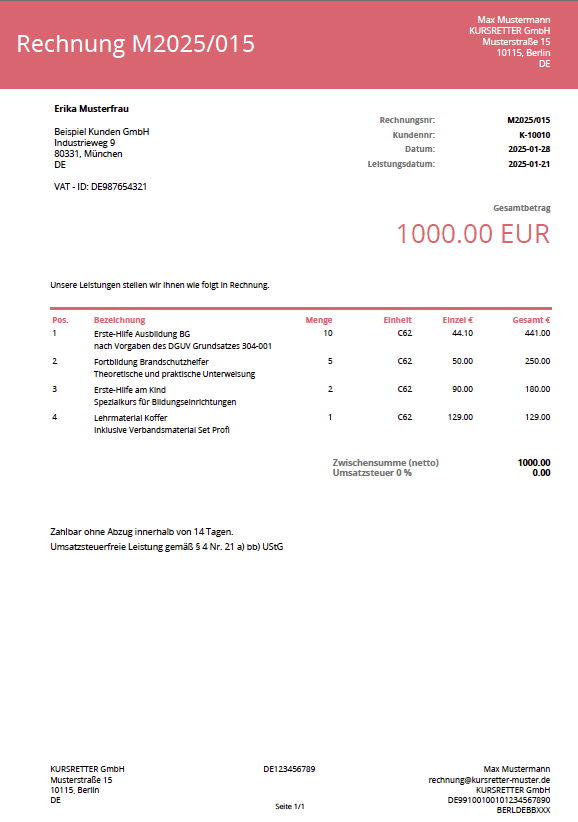
The real template is open above with a sample invoice from a fictional studio to a Berlin client: billed to and from details, due date and payment terms, line items, a payment QR code with IBAN and reference, the amount due with subtotal and VAT, and a Factur-X and ZUGFeRD mark. Change the data, add your logo, move fields and switch to Preview to see the PDF. You do not need an account to try it. Create a free one when you want to keep your version and generate documents from your own data.
Generate this template from the tools you already use
Connect the template to your workflow tool, ERP, no code app or AI agent. Every integration sends your data to the same template and returns the finished PDF, so you never retype a document.
 n8nA ready node for workflows that create and send documents.
 MakeVisual scenarios that connect the template to thousands of apps.
 ZapierGenerate a PDF whenever a trigger fires in a Zap.
 OdooDocuments from Odoo records, without QWeb or XML.
 KintoneTurn any Kintone record into a print ready document.
 AirtableAn extension that turns records into branded PDFs.
 BubbleA plugin that generates PDFs from your app data.
At a glance
What is a white label invoice?
A white label invoice is issued by a software platform or agency but carries the brand of the business that sells to the end customer. The platform holds the data and sends the invoice, while the customer sees the logo, colors and details of the company they bought from.
This free white label invoice template is built for SaaS platforms, marketplaces, booking systems and agencies that invoice on behalf of many businesses. One template serves every account: each business sets its own logo and colors in the embedded template editor inside your product, and your app sends the invoice data. The documents are generated with the PDF Generator API.
| Document type | Invoice, issued under your customer’s brand |
|---|---|
| When to use | A platform or agency invoices on behalf of many businesses |
| Sections | Billed to, from, due date, line items, payment, totals |
| Data fields | Invoice number, seller, buyer, line items, VAT rate, IBAN |
| Output formats | PDF, returned as a URL or base64 |
| E-invoice ready | Yes, with the E-Invoice API: Factur-X, ZUGFeRD and XRechnung |
| Live editor | Yes, open it at the top of this page |
| Generate with | REST API, Make, n8n, Zapier or an AI agent through MCP |
| Price | Free template, 14 day sandbox account |
Last reviewed November 2026 by the PDF Generator API team. The companies, people and numbers in the sample are fictional.
Template contents
What the white label invoice template includes
Every section is bound to data fields, so the same template prints a new document for every record you send. Open the Data tab in the live template above to see the full sample JSON.
- 01Brand and titleYour customer’s logo and colors, invoice number and issue date.
- 02Billed to and fromBuyer and seller names and addresses.
- 03Due datePayment date and terms, such as net 14.
- 04Line itemsDescription, quantity, price and total, one row per item.
- 05PaymentQR code with IBAN, payment reference, bank and BIC, so the buyer can pay from a banking app.
- 06Totals and footerAmount due, subtotal and VAT, a thank you line and the e-invoice mark.
Automate it
How to generate a white label invoice from your data
Send each record to the API and get one PDF back, as a URL or base64. No code? Run the same flow in Make, n8n or Zapier, or ask your AI agent through the MCP server.
- Copy the template. Create a free account, open this white label invoice template and save it to your workspace.
- Make it yours. Replace the sample logo, colors and wording in the template editor, or describe the change to the AI template builder.
- Send the data. Post the JSON from your platform’s billing data to
/documents/generatewith your template ID. - Send it under the right brand. Pass the template ID of the customer’s copy with each request, and email the PDF or add it to their portal.
curl -X POST https://us1.pdfgeneratorapi.com/api/v4/documents/generate \
  -H "Authorization: Bearer <your-token>" \
  -H "Content-Type: application/json" \
  -d '{
    "template": {
      "id": <your-template-id>,
      "data": {
        "invoice": { "number": "INV-2026-0931", "issued": "16 Nov 2026", "dueDate": "30 Nov 2026", "terms": "Net 14" },
        "seller": { "name": "Kitefly s.r.o.", "iban": "CZ6508000000192000145399" },
        "buyer": { "name": "Moss & Pine GmbH", "address": "Torstrasse 88, 10119 Berlin" },
        "items": [ { "description": "Brand workshop, half day", "qty": 1, "price": 900 } ],
        "vatRate": 21
      }
    },
    "format": "pdf",
    "output": "url"
  }'
The payload is trimmed and the field names are shortened. The live template holds the full sample, and the API documentation lists every output option.
Related templates
More templates like this one
Each one opens in the same editor and fills from the same API. Browse the full free template library, or see pricing when you are ready to generate in volume.

FAQ